Join us at FabCon Atlanta from March 16 - 20, 2026, for the ultimate Fabric, Power BI, AI and SQL community-led event. Save $200 with code FABCOMM.
Register now!The Power BI Data Visualization World Championships is back! Get ahead of the game and start preparing now! Learn more
I'm looking all over the place to figure out how to get YTD numbers to stop at the last month where there is information for the month. [Actual $] below only goes to the end of August, but the YTD goes to the end of the year and is just flat for the final four months. I don't understand.
YTD Actual:=CALCULATE([Actual $],filter(DATESYTD(DateTable[Date]),[Actual $]>0))
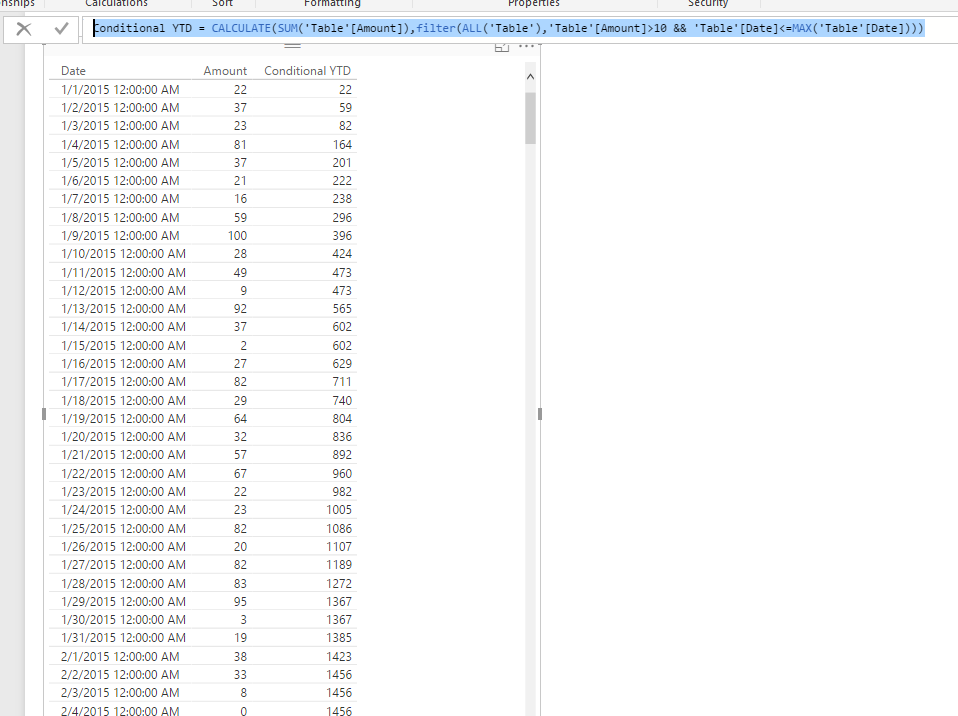
In DAX, the DATESYTD() return the table of YTD dates in current context, which means it applies on each row. Based on your expression, I assume you want to calculate the YTD on an filtered table context. Please refer to my sample formula below:
Conditional YTD = CALCULATE(SUM('Table'[Amount]),filter(ALL('Table'),'Table'[Amount]>10 && 'Table'[Date]<=MAX('Table'[Date])))
Regards,
The Power BI Data Visualization World Championships is back! Get ahead of the game and start preparing now!