Join us at FabCon Atlanta from March 16 - 20, 2026, for the ultimate Fabric, Power BI, AI and SQL community-led event. Save $200 with code FABCOMM.
Register now!The Power BI Data Visualization World Championships is back! Get ahead of the game and start preparing now! Learn more
I have create a Workspace V2. Now I want to attach a OneDrive location to the Workspace.
I click on the Ellipsis for the Workspace, Then Select Workspace settings. The menu dialog opens for the settings.
Open the Advanced window. Then Enter a OneDrive location, something similar to the following:
https://mycompany.sharepoint.com/sites/data-dev/Shared%20Documents/Forms/AllItems.aspx
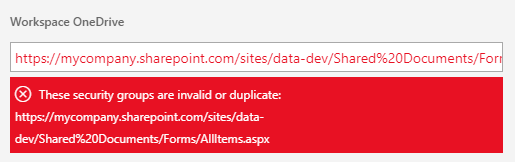
When I do this I get a Error message:
I have tried all kinds of URL permutations:
https://mycompany.sharepoint.com/sites/data-dev/Shared%20Documents/Forms/
https://mycompany.sharepoint.com/sites/data-dev/Shared%20Documents/
https://mycompany.sharepoint.com/sites/data-dev/Shared%20Documents
https://mycompany.sharepoint.com/sites/data-dev
and seems like none of them work. All of the URLs have the same error message:
These Security Gorups are Invalid or Duplicate.
Any help would be appreciated.
Solved! Go to Solution.
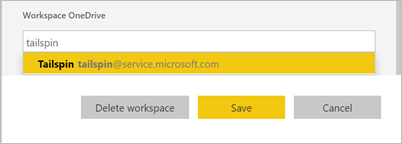
In the option, you should input the workspace group name(In O365 you can view these group names) like below:
Reference:
https://docs.microsoft.com/en-us/power-bi/service-create-the-new-workspaces#workspace-onedrive
Community Support Team _ Jimmy Tao
If this post helps, then please consider Accept it as the solution to help the other members find it more quickly.
In the option, you should input the workspace group name(In O365 you can view these group names) like below:
Reference:
https://docs.microsoft.com/en-us/power-bi/service-create-the-new-workspaces#workspace-onedrive
Community Support Team _ Jimmy Tao
If this post helps, then please consider Accept it as the solution to help the other members find it more quickly.
The Power BI Data Visualization World Championships is back! Get ahead of the game and start preparing now!
| User | Count |
|---|---|
| 44 | |
| 44 | |
| 41 | |
| 15 | |
| 15 |