cancel
Showing results for 
Search instead for 
Did you mean: 

We've captured the moments from FabCon & SQLCon that everyone is talking about, and we are bringing them to the community, live and on-demand. Starts on April 14th. Register now

Reply
Anonymous
Not applicable

Weekly update automatically (please help)

Hi all,


I am just getting started with the app.powerbi.com


I have a report that I want to update weekly and share on this platform.

Currently it's a very manual process. So please help me automate this.


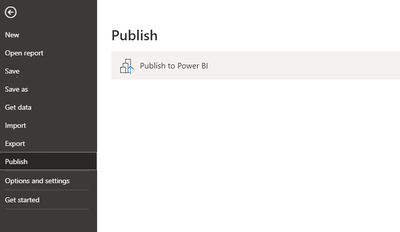
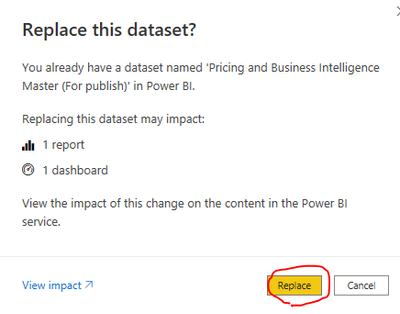
What I do now is shown here below in pictures:


Click this once a week. (its getting data from a SQL database)

kolovez_0-1638782918992.png


Afterwards:

kolovez_1-1638782953068.png

kolovez_2-1638783078485.png


I have read a bunch of different articles online, so please respond to this specific situation instead of redirecting me to a very detailed "automatically update power bi" article.

 I appreciate all the help I can get! 🙂 


This is the end location:

kolovez_0-1638783575890.png


1 ACCEPTED SOLUTION

HI @Anonymous 

You don't neeed any special licence to Refresh the dataset, this can be done with a Free or Pro licence.

The document @Anonymous shared is very slightly dated, as the user interface has changed a little since it was published.

To get to the Refresh options, on the Dataset click on the "Square" second Icon, or from the more option (three dots) select "Settings".

Burningsuit_0-1638791246083.png

After that follow the documentation. If your database is held on an on-premise server (an internal server inside your organisation) you'll need to have a Gateway configured. If your database is already in the cloud ( Microsoft Azure SQL server for example) you won't need a Gateway. You'll need to provide credentials (login details) for the database, or gateway used. You can then schedule slots for automatic refresh. Note you can have up to 8 refresh slots per day for each Dataset with a Free or Pro account.

If you need a Gateway, this video from "Guy in a Cube" may help: https://youtu.be/Vlv1tbuZNcM

Hope this helps

Stuart


View solution in original post

3 REPLIES 3
Anonymous
Not applicable

Hi @Anonymous ,


Please follow- https://docs.microsoft.com/en-us/power-bi/connect-data/refresh-scheduled-refresh to configure the weekly refresh for your Power BI report.


Anonymous
Not applicable

I dont have the same options available as shown in the guide/link you shared.

Do you know @Anonymous  , if I need Power BI premium or if the Pro version be enough to achieve this scheduled refresh? 

HI @Anonymous 

You don't neeed any special licence to Refresh the dataset, this can be done with a Free or Pro licence.

The document @Anonymous shared is very slightly dated, as the user interface has changed a little since it was published.

To get to the Refresh options, on the Dataset click on the "Square" second Icon, or from the more option (three dots) select "Settings".

Burningsuit_0-1638791246083.png

After that follow the documentation. If your database is held on an on-premise server (an internal server inside your organisation) you'll need to have a Gateway configured. If your database is already in the cloud ( Microsoft Azure SQL server for example) you won't need a Gateway. You'll need to provide credentials (login details) for the database, or gateway used. You can then schedule slots for automatic refresh. Note you can have up to 8 refresh slots per day for each Dataset with a Free or Pro account.

If you need a Gateway, this video from "Guy in a Cube" may help: https://youtu.be/Vlv1tbuZNcM

Hope this helps

Stuart


Helpful resources

Announcements
New to Fabric survey Carousel

New to Fabric Survey

If you have recently started exploring Fabric, we'd love to hear how it's going. Your feedback can help with product improvements.

Power BI DataViz World Championships carousel

Power BI DataViz World Championships - June 2026

A new Power BI DataViz World Championship is coming this June! Don't miss out on submitting your entry.

Join our Fabric User Panel

Join our Fabric User Panel

Share feedback directly with Fabric product managers, participate in targeted research studies and influence the Fabric roadmap.

March Power BI Update Carousel

Power BI Community Update - March 2026

Check out the March 2026 Power BI update to learn about new features.