cancel
Showing results for 
Search instead for 
Did you mean: 

The Power BI Data Visualization World Championships is back! Get ahead of the game and start preparing now! Learn more

Reply
gwoodley
Frequent Visitor

Visual Interactions help

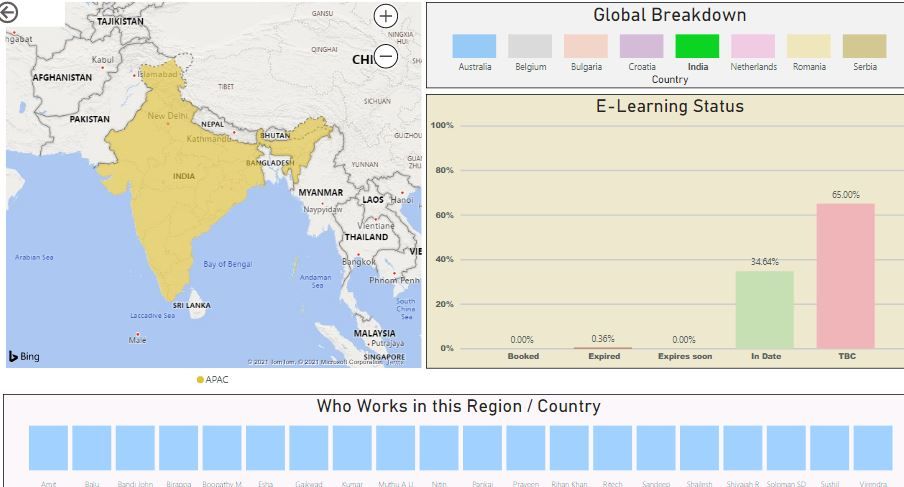
Hi I have four visuals setup as follows;

Picture 1.JPG


If I click on the map or "Global Breakdown" Chart the "E-Learning" & "Who Works in this Region / Country" charts adjust as expected.


The problem I have is I then want to be able to select different name listed within the "Who works in this Region / Country" chart one after another to adjust the e-learning chart to see teh status on a person by person level, this works but the names in listed within the "Who Works in this Region / Country" Chart resets back to show everyone in the world so I have to press the country again to get back to the filtered chart. Is there a way I can stop this?


Hope that makes sense, apoloigies if this is simple but I'm new to Power Bi.


Many thanks.


1 ACCEPTED SOLUTION
Anonymous
Not applicable

HI @gwoodley 

  When you select one data component ( ex: country in your case), all other visuals will be filtered based on the cross filter direction in your datamodel (and Edit interaction setup in the page). When you selct the another data component, Power BI releases the existing filter and will start filtering based on the latest selection ( in your case who works?). 


You need to press control key to include second data component in the selection. ( Click the "India" first + press control key + select the who works? component).


Thanks
Raj

View solution in original post

2 REPLIES 2
Anonymous
Not applicable

HI @gwoodley 

  When you select one data component ( ex: country in your case), all other visuals will be filtered based on the cross filter direction in your datamodel (and Edit interaction setup in the page). When you selct the another data component, Power BI releases the existing filter and will start filtering based on the latest selection ( in your case who works?). 


You need to press control key to include second data component in the selection. ( Click the "India" first + press control key + select the who works? component).


Thanks
Raj

Thanks Raj,


That really was easy🤔

Helpful resources

Announcements
Power BI DataViz World Championships

Power BI Dataviz World Championships

The Power BI Data Visualization World Championships is back! Get ahead of the game and start preparing now!

December 2025 Power BI Update Carousel

Power BI Monthly Update - December 2025

Check out the December 2025 Power BI Holiday Recap!

FabCon Atlanta 2026 carousel

FabCon Atlanta 2026

Join us at FabCon Atlanta, March 16-20, for the ultimate Fabric, Power BI, AI and SQL community-led event. Save $200 with code FABCOMM.