cancel
Showing results for 
Search instead for 
Did you mean: 

Join the FabCon + SQLCon recap series. Up next: Power BI, Real-Time Intelligence, IQ and AI, and Data Factory take center stage. All sessions are available on-demand after the live show. Register now

Reply
Anonymous
Not applicable

Updating Connection Credentials

Hello Guys,

The database passwords within my organizations are set to expire every 30 days and would need to be changed. I have alot of reports published to different workspaces and i usually go and update the new passwords all of the reports one by one even though most of them are connecting to the same database.

I would like to find out if there is a way i can just update the crendentials for all the reports at once?

1 ACCEPTED SOLUTION
v-robertq-msft
Community Support
Community Support

Hi, @Anonymous 

Do your datasets need a gateway to be refreshed?

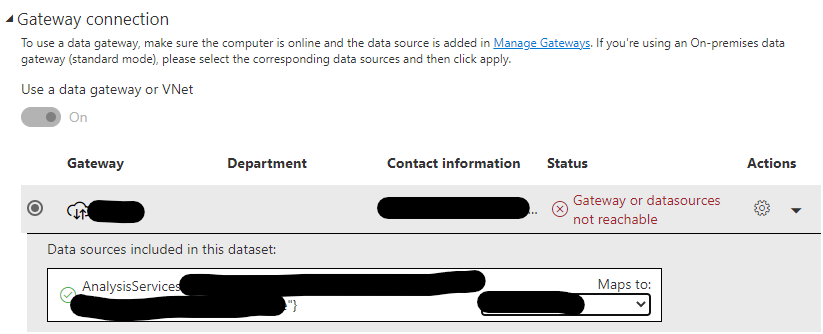
According to your description, you said you have to update the new passwords for all of the reports one by one. But I don’t think you have to do so, because you can just configure one data source in the gateway and map it to each dataset that connects to this data source.

v-robertq-msft_0-1616146343899.png


If your datasource is in the cloud and don’t need gateway, you can just try to use one dataset to create multiple reports. This method can also help you to update as less crendentials as you can when the password is changed.


Best Regards,

Community Support Team _Robert Qin

If this post helps, then please consider Accept it as the solution to help the other members find it more quickly.

View solution in original post

2 REPLIES 2
v-robertq-msft
Community Support
Community Support

Hi, @Anonymous 

Do your datasets need a gateway to be refreshed?

According to your description, you said you have to update the new passwords for all of the reports one by one. But I don’t think you have to do so, because you can just configure one data source in the gateway and map it to each dataset that connects to this data source.

v-robertq-msft_0-1616146343899.png


If your datasource is in the cloud and don’t need gateway, you can just try to use one dataset to create multiple reports. This method can also help you to update as less crendentials as you can when the password is changed.


Best Regards,

Community Support Team _Robert Qin

If this post helps, then please consider Accept it as the solution to help the other members find it more quickly.

nandukrishnavs
Community Champion
Community Champion

@Anonymous 


Try to configure the On-premises data gateway and add the data source credentials to a particular cluster. So, you can reuse the same connection across multiple reports. 


Regards,
Nandu Krishna

Did I answer your question? Mark my post as a solution!
Appreciate with a kudos 👍

Proud to be a Super User!


Regards,
Nandu Krishna

Helpful resources

Announcements
April Power BI Update Carousel

Power BI Monthly Update - April 2026

Check out the April 2026 Power BI update to learn about new features.

New to Fabric survey Carousel

New to Fabric Survey

If you have recently started exploring Fabric, we'd love to hear how it's going. Your feedback can help with product improvements.

Power BI DataViz World Championships carousel

Power BI DataViz World Championships - June 2026

A new Power BI DataViz World Championship is coming this June! Don't miss out on submitting your entry.

FabCon and SQLCon Highlights Carousel

FabCon &SQLCon Highlights

Experience the highlights from FabCon & SQLCon, available live and on-demand starting April 14th.