
Share feedback directly with Fabric product managers, participate in targeted research studies and influence the Fabric roadmap.
Sign up nowGet Fabric certified for FREE! Don't miss your chance! Learn more
Hello Community,
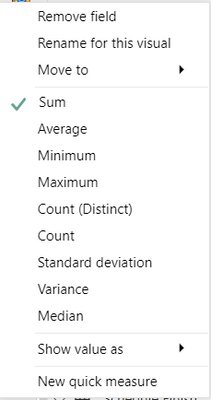
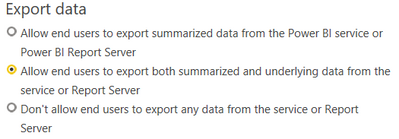
Its my new venture with PBI , my problem is after publishing my report in service, users are not able to export underlying data. All permissons are enabled both at report and service level. If I use report measures (dax generated measures) then underlying data is not exporting the complete data but only the aggregated data whereas if I aggregate the data with PBI aggregate functions :
The undrlying data export working fine. The problem only lies with dax measures in the report.
--> this is option is unabled.
Thank you in advance.
Hi @Anonymous ,
It all works well in my test, would you please show us more details about what field are you using in the visual? And please also try to use table visual to export data.
If this post help, please consider accept it as the solution to help others find it more quickly.
Best Regard,
Dedmon Dai
Hi @Anonymous ,
Did you mean you can use export underlying data but the exported data is aggregated?
Best Regards,
Dedmon Dai
Yes thats the problem.
Hi @Anonymous ,
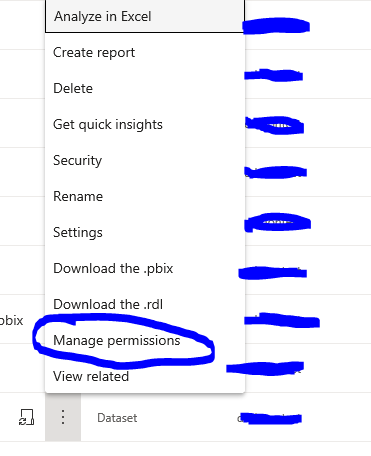
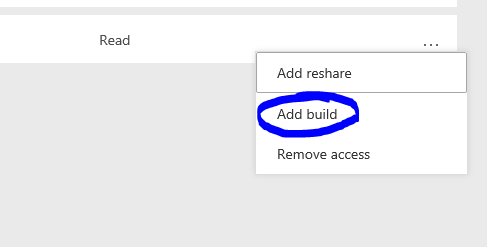
Would you please check if the user has build permission for the dataset?
And you can also refer to the similar post: https://community.powerbi.com/t5/Service/Export-Underlying-Data-not-working/td-p/728568
If this post helps, then please consider Accept it as the solution to help the other members find it more quickly.
Best Regards,
Dedmon Dai
Yes, All the permissions are checked ok and measures are in there respective tables.
If you love stickers, then you will definitely want to check out our Community Sticker Challenge!
Check out the January 2026 Power BI update to learn about new features.
| User | Count |
|---|---|
| 19 | |
| 10 | |
| 8 | |
| 7 | |
| 7 |
| User | Count |
|---|---|
| 51 | |
| 44 | |
| 30 | |
| 27 | |
| 25 |