cancel
Showing results for 
Search instead for 
Did you mean: 

Level up your Power BI skills this month - build one visual each week and tell better stories with data! Get started

Reply
apfenech1
New Member

Unable to update data source credentials

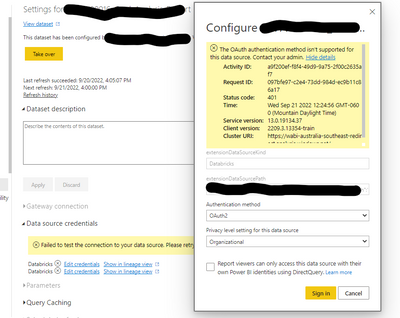
Previously, it was possible to update the data source credentials regardless of being an owner of the dataset.  Now, whenever we go to update the data source credentials, errrors are thrown.  The only way to update the credentials is to take over the dataset. 


In these first images, I am not the current dataset owner and am unable to connect with OAuth or with the account key.  When I try to update the credentials for OAuth, it says that is not allowed and to reach out to an admin.  When I try to use the account key, it also fails and does not allow to connect.
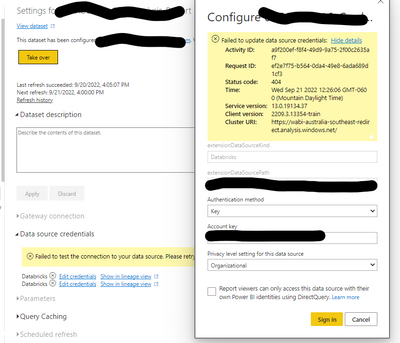
Screenshot 2022-09-21 122632.pngScreenshot 2022-09-21 122543.png


When I take over the dataset, I can update with either OAuth or an account key and both authentication methods successfully connect.  In the image below, I am the dataset owner and successfully connect with both OAuth and the account key.
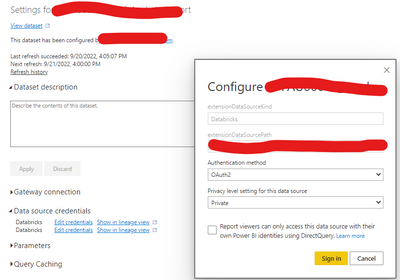
5ea80e70-c0c7-4832-bfb9-10572e35dfe5.png


This was not an issue until recently (I believe it started in the last 1 day or so).  Prior, we would be able to update the data source credentials without having to take ownership of the dataset.  Additionally, the error messages it is presenting in the first images seem to be incorrect; particularly noted with the OAuth error not being correct.


The images only show a Databricks data source, however this issue is persistant across any datasource including Sharepoint, Databricks, and others.


EDITED TO ADD:

It should probably also be noted - once I take over the dataset, I don't even have to update the credentials for the data sources to connect successfully; they validate themselves with the information that was already stored with the dataset prior to taking over the dataset.

1 ACCEPTED SOLUTION
v-luwang-msft
Community Support
Community Support

Hi @apfenech1 ,

According to the official article description, which is currently the normal case, only the dataset owner can configure to edit the dataset:

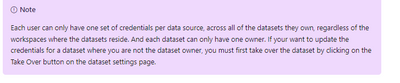
Each user can only have one set of credentials per data source, across all of the datasets they own, regardless of the workspaces where the datasets reside. And each dataset can only have one owner. If your want to update the credentials for a dataset where you are not the dataset owner, you must first take over the dataset by clicking on the Take Over button on the dataset settings page.

vluwangmsft_0-1663813668702.png

refer:

https://learn.microsoft.com/en-us/power-bi/connect-data/refresh-data 


Best Regards

Lucien

View solution in original post

1 REPLY 1
v-luwang-msft
Community Support
Community Support

Hi @apfenech1 ,

According to the official article description, which is currently the normal case, only the dataset owner can configure to edit the dataset:

Each user can only have one set of credentials per data source, across all of the datasets they own, regardless of the workspaces where the datasets reside. And each dataset can only have one owner. If your want to update the credentials for a dataset where you are not the dataset owner, you must first take over the dataset by clicking on the Take Over button on the dataset settings page.

vluwangmsft_0-1663813668702.png

refer:

https://learn.microsoft.com/en-us/power-bi/connect-data/refresh-data 


Best Regards

Lucien

Helpful resources

Announcements
April Power BI Update Carousel

Power BI Monthly Update - April 2026

Check out the April 2026 Power BI update to learn about new features.

Fabric SQL PBI Data Days

Data Days 2026 coming soon!

Sign up to receive a private message when registration opens and key events begin.

New to Fabric survey Carousel

New to Fabric Survey

If you have recently started exploring Fabric, we'd love to hear how it's going. Your feedback can help with product improvements.

Power BI DataViz World Championships carousel

Power BI DataViz World Championships - June 2026

A new Power BI DataViz World Championship is coming this June! Don't miss out on submitting your entry.