FabCon is coming to Atlanta
Join us at FabCon Atlanta from March 16 - 20, 2026, for the ultimate Fabric, Power BI, AI and SQL community-led event. Save $200 with code FABCOMM.
Register now!- Power BI forums
- Get Help with Power BI
- Desktop
- Service
- Report Server
- Power Query
- Mobile Apps
- Developer
- DAX Commands and Tips
- Custom Visuals Development Discussion
- Health and Life Sciences
- Power BI Spanish forums
- Translated Spanish Desktop
- Training and Consulting
- Instructor Led Training
- Dashboard in a Day for Women, by Women
- Galleries
- Data Stories Gallery
- Themes Gallery
- Contests Gallery
- QuickViz Gallery
- Quick Measures Gallery
- Visual Calculations Gallery
- Notebook Gallery
- Translytical Task Flow Gallery
- TMDL Gallery
- R Script Showcase
- Webinars and Video Gallery
- Ideas
- Custom Visuals Ideas (read-only)
- Issues
- Issues
- Events
- Upcoming Events
The Power BI Data Visualization World Championships is back! Get ahead of the game and start preparing now! Learn more
- Power BI forums
- Forums
- Get Help with Power BI
- Service
- Re: Unable to refresh the model because it referen...
- Subscribe to RSS Feed
- Mark Topic as New
- Mark Topic as Read
- Float this Topic for Current User
- Bookmark
- Subscribe
- Printer Friendly Page

- Mark as New
- Bookmark
- Subscribe
- Mute
- Subscribe to RSS Feed
- Permalink
- Report Inappropriate Content
Unable to refresh the model because it references an unsupported data source.
Hi,
I created a PBIX file using powerbi desktop. it contains
- 18 queries using the Web.Contents source (querying anonymously an online REST API)
- 1 query using the "Enter Data" feature - Table.FromRows(Json.Document(Binary.Decompress(Binary.FromText(...
I uploaded this PBIX file and created a dashboard and now I see that it never refreshed because it references an unsupported data source.
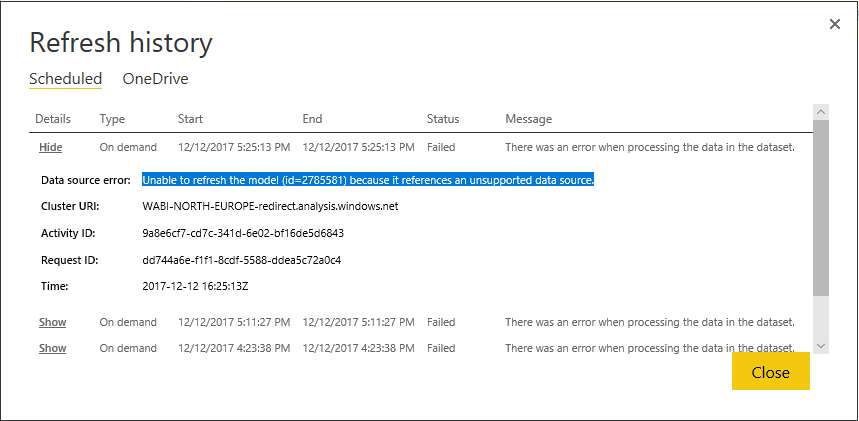
What can I do to identify this unsupported data source ?
The REST API needs an auth token, this auth token is never expiring and is hardcoded in my queries. is that the issue ?

- Mark as New
- Bookmark
- Subscribe
- Mute
- Subscribe to RSS Feed
- Permalink
- Report Inappropriate Content
I received the same error "references an unsupported data source". My issue was because I had the connection string property "Application Name" set. Once I removed the Application Name property it started working. My scenario was me migrating an SSAS 2016 tabular model to Power BI Premium (as a dataset).


- Mark as New
- Bookmark
- Subscribe
- Mute
- Subscribe to RSS Feed
- Permalink
- Report Inappropriate Content
Has any one found a solution to this yet? I am in the same situation, getting my data from a JSON API and unable to schedule data refreshes due to the data source being unsupported. @v-caliao-msft @dsebban @BIsteht
Unable to refresh the model (id=379417) because it references an unsupported data source.


- Mark as New
- Bookmark
- Subscribe
- Mute
- Subscribe to RSS Feed
- Permalink
- Report Inappropriate Content
@olimilo I did. Code snippets below. I don't recall exactly where I found the base function. I updated what I found to fit my needs. This hits the Pipedrive Deals endpoint. Function name is GetDeals:
(start as number) as record =>
let
Source = Json.Document(
Web.Contents(
"https://companydomain.pipedrive.com/v1/deals",
[Query = [
start = "" & Number.ToText(start) &"" ,
limit = "500",
api_token = "YOURTOKEN"
]]
)
)
in
Source
This pulls the records to a staging query where I then just expand the record list and model as needed. No issues since using this approach. Staging query below:
let
Source = List.Generate( ()=>
[Result= try GetDeals(0) otherwise null, Start = 0],
each [Result] <> null,
each [Result = try GetDeals([Result][additional_data][pagination][next_start]) otherwise null, Start = [Result][additional_data][pagination][next_start]],
each [Result])
in
Source
Hope this helps.
- Mark as New
- Bookmark
- Subscribe
- Mute
- Subscribe to RSS Feed
- Permalink
- Report Inappropriate Content
i am facing the same issue. i am pulling the data from SharePoint and using a python script to manipulate the data in power BI .
- Mark as New
- Bookmark
- Subscribe
- Mute
- Subscribe to RSS Feed
- Permalink
- Report Inappropriate Content
Hey @BIsteht, I was able to solve mine by referring to the article here: https://blog.crossjoin.co.uk/2016/08/16/using-the-relativepath-and-query-options-with-web-contents-i...
Basically what I did was separate the Web API's URL between a static URL and a variable URL like below:
1 2 3 4 5 6 7 8 9 10 11 | Web.Contents( [ RelativePath="3/action/package_search", Query= [ q="cows", rows="20" ] ] ) |


- Mark as New
- Bookmark
- Subscribe
- Mute
- Subscribe to RSS Feed
- Permalink
- Report Inappropriate Content
You need to compare your data source provider with the list of supported data sources found within Refresh data in Power BI to check if it's a supported datasource. Please refer to the link below to see the details.
https://docs.microsoft.com/en-us/power-bi/service-admin-troubleshoot-unsupported-data-source-for-ref...
Regards,
Charlie Liao
- Mark as New
- Bookmark
- Subscribe
- Mute
- Subscribe to RSS Feed
- Permalink
- Report Inappropriate Content
- Mark as New
- Bookmark
- Subscribe
- Mute
- Subscribe to RSS Feed
- Permalink
- Report Inappropriate Content
@dsebban @v-caliao-msft same issue here. A single API call with token embedded in the URL refreshed fine for months. I added a function to page the API yesterday and now the scheduled refresh fails. I vaguely recall seeing some literature on this issue but cannot find it anywhere.
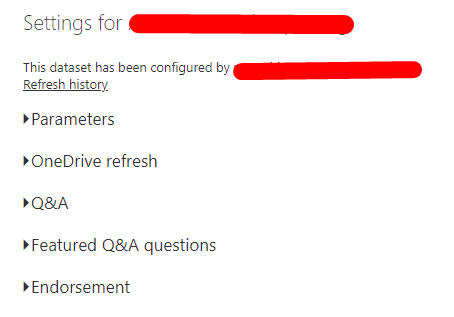
The other odd thing is that I cannot see ANY of the datasources in the model when I try to review the settings. No Gateway Connection or Datasource Credentials options.
- Mark as New
- Bookmark
- Subscribe
- Mute
- Subscribe to RSS Feed
- Permalink
- Report Inappropriate Content

Helpful resources

Power BI Dataviz World Championships
The Power BI Data Visualization World Championships is back! Get ahead of the game and start preparing now!

Power BI Monthly Update - November 2025
Check out the November 2025 Power BI update to learn about new features.

FabCon Atlanta 2026
Join us at FabCon Atlanta, March 16-20, for the ultimate Fabric, Power BI, AI and SQL community-led event. Save $200 with code FABCOMM.


