Join us at FabCon Atlanta from March 16 - 20, 2026, for the ultimate Fabric, Power BI, AI and SQL community-led event. Save $200 with code FABCOMM.
Register now!The Power BI Data Visualization World Championships is back! Get ahead of the game and start preparing now! Learn more
Hey everyone!
I am in the process of consolidating our data sets so that similar reports will only connect to one data set (the reports I inherited have one data set for each report).
However, when I connect an existing report to the new PowerBI Data set and try to publish it, I could not see some existing workspaces that I would otherwise see when I am publishing a report with the local query built into it.
I tried to upload the file on the PBI Services but got an error, too. The only workaround I have seen thus far is to create a new workspace and transfer all of my content there. Help! 🙂
Solved! Go to Solution.
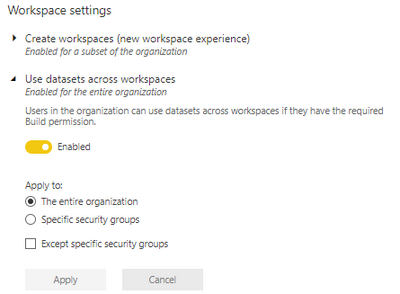
Hi @Anonymous make sure in Tenant settings "Use datasets across workspaces" is Enabled for you or for entire organization.
If this post helps, then please consider Accept it as the solution and give it a thumbs up
Hi @Anonymous make sure in Tenant settings "Use datasets across workspaces" is Enabled for you or for entire organization.
If this post helps, then please consider Accept it as the solution and give it a thumbs up
Hi Arvind,
This setting is akready enabled, but yet I still cannot see the workspaces I need to access..
Check out the November 2025 Power BI update to learn about new features.
Advance your Data & AI career with 50 days of live learning, contests, hands-on challenges, study groups & certifications and more!