Jumpstart your career with the Fabric Career Hub
Find everything you need to get certified on Fabric—skills challenges, live sessions, exam prep, role guidance, and more.
Get started- Power BI forums
- Updates
- News & Announcements
- Get Help with Power BI
- Desktop
- Service
- Report Server
- Power Query
- Mobile Apps
- Developer
- DAX Commands and Tips
- Custom Visuals Development Discussion
- Health and Life Sciences
- Power BI Spanish forums
- Translated Spanish Desktop
- Power Platform Integration - Better Together!
- Power Platform Integrations (Read-only)
- Power Platform and Dynamics 365 Integrations (Read-only)
- Training and Consulting
- Instructor Led Training
- Dashboard in a Day for Women, by Women
- Galleries
- Community Connections & How-To Videos
- COVID-19 Data Stories Gallery
- Themes Gallery
- Data Stories Gallery
- R Script Showcase
- Webinars and Video Gallery
- Quick Measures Gallery
- 2021 MSBizAppsSummit Gallery
- 2020 MSBizAppsSummit Gallery
- 2019 MSBizAppsSummit Gallery
- Events
- Ideas
- Custom Visuals Ideas
- Issues
- Issues
- Events
- Upcoming Events
- Community Blog
- Power BI Community Blog
- Custom Visuals Community Blog
- Community Support
- Community Accounts & Registration
- Using the Community
- Community Feedback
Grow your Fabric skills and prepare for the DP-600 certification exam by completing the latest Microsoft Fabric challenge.
- Power BI forums
- Forums
- Get Help with Power BI
- Service
- Re: Unable to print the logo from Power BI Service
- Subscribe to RSS Feed
- Mark Topic as New
- Mark Topic as Read
- Float this Topic for Current User
- Bookmark
- Subscribe
- Printer Friendly Page

- Mark as New
- Bookmark
- Subscribe
- Mute
- Subscribe to RSS Feed
- Permalink
- Report Inappropriate Content
Unable to print the logo from Power BI Service
Hi ,
I'm unable to print the company logo/visual from Power BI Service - it's showing empty space.
Is there any workaround to print?
Thanks

- Mark as New
- Bookmark
- Subscribe
- Mute
- Subscribe to RSS Feed
- Permalink
- Report Inappropriate Content
Thanks, i use gateway for connecting sahrepoint , blob aswell. now that is another issue we are as organisation facing is when i join two tables from sql and sharepoint, then refresh fails using gateway but dasktop refresh is fine.
now this logo , i have tried using table visual and make some cosmetic adjustments, thenafter i can export the logos as pdf and ppt. but when i use image visuals from market place, then i cant export into ppt,pdf.
so is this may also be a reason (using image grid and simple image visuals from third party on market place) for logo failures. by using table visual, size is coming small, but i am happy that atleastmy users are able to export their reports in pdf and ppt with the logo, and go to their meetings.
can you please clarify on this plz, will be a great help.


- Mark as New
- Bookmark
- Subscribe
- Mute
- Subscribe to RSS Feed
- Permalink
- Report Inappropriate Content
when i join two tables from sql and sharepointDANGER DANGER DANGER
When you do that your sharepoint source must be declared in the gateway as well and you need to configure the gateway to process cloud sources. Try to avoid that as much as possible.
- Mark as New
- Bookmark
- Subscribe
- Mute
- Subscribe to RSS Feed
- Permalink
- Report Inappropriate Content
Hi, i think i am not understood well. i have logos in sharepoint. and i have to pull the images from sharepoint to report. i deal with multiple clients ,so as per my requirement i need to use a templet where i can use ids as parameter and pull respective images to the report with multiple pages. on desktop it runs fine, and in service also i can see images, but when i try to export the report as pdf or ppt, report is coming out with blank logo. so i have changes my data source of images from sharepoint to Azure Blob Container, but no luck. when i use only one datasource i.e blob containers, i can export in pdf and ppt, but when i tried with original report where my data are coming from sql servers and logos are from blob containers, then again logos are coming blank. so i think its a issue with gateway. can anyone help on this. plz.
- Mark as New
- Bookmark
- Subscribe
- Mute
- Subscribe to RSS Feed
- Permalink
- Report Inappropriate Content
Gateway should not be involved since these are all cloud data sources. Check that the Azure Blob storage is accessible without any authentication.
- Mark as New
- Bookmark
- Subscribe
- Mute
- Subscribe to RSS Feed
- Permalink
- Report Inappropriate Content
Hi,
still having issues, if u export into powerpoint , the logo doesnot appear.
any solution?
regards
Satyabrata
- Mark as New
- Bookmark
- Subscribe
- Mute
- Subscribe to RSS Feed
- Permalink
- Report Inappropriate Content
Yes, still i'm facing the issue while printing (print this page option from file menu).
When i exporting to powerpoint i don't have any issues.
- Mark as New
- Bookmark
- Subscribe
- Mute
- Subscribe to RSS Feed
- Permalink
- Report Inappropriate Content
Show how you embed the image.
- Mark as New
- Bookmark
- Subscribe
- Mute
- Subscribe to RSS Feed
- Permalink
- Report Inappropriate Content
Hi Ibendlin,
its an embed url. having issue with ppt, pdf export. in export also the logo is empty.
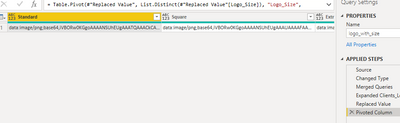
please help.
- Mark as New
- Bookmark
- Subscribe
- Mute
- Subscribe to RSS Feed
- Permalink
- Report Inappropriate Content
Let me test on my side. Should work.
- Mark as New
- Bookmark
- Subscribe
- Mute
- Subscribe to RSS Feed
- Permalink
- Report Inappropriate Content
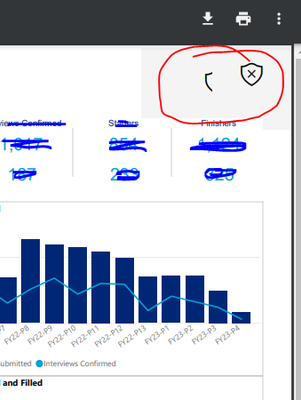
i saved the logo in sharepoint and pulling through query with all the long and short type,, still on pdf or powerpoint, it coming blank like this. and its not just one, i have around fifty reports with different logos/images. all same.can anyone help.
- Mark as New
- Bookmark
- Subscribe
- Mute
- Subscribe to RSS Feed
- Permalink
- Report Inappropriate Content
Power BI service doesn't have access to the logo location. One alternative is to embed the logo into the Power BI dataset.
- Mark as New
- Bookmark
- Subscribe
- Mute
- Subscribe to RSS Feed
- Permalink
- Report Inappropriate Content
this would then be more of a printer driver problem, no?
- Mark as New
- Bookmark
- Subscribe
- Mute
- Subscribe to RSS Feed
- Permalink
- Report Inappropriate Content
after you export to PDF do you see the logo in the PDF file?
- Mark as New
- Bookmark
- Subscribe
- Mute
- Subscribe to RSS Feed
- Permalink
- Report Inappropriate Content
Yes


- Mark as New
- Bookmark
- Subscribe
- Mute
- Subscribe to RSS Feed
- Permalink
- Report Inappropriate Content
Hi, @pippalla77
Please try to change the browser or clear the cache and print again.
You can also consider exporting the report to PPT, PDF, PBIX to local and then printing.
Best Regards,
Community Support Team _ Eason
- Mark as New
- Bookmark
- Subscribe
- Mute
- Subscribe to RSS Feed
- Permalink
- Report Inappropriate Content
Thanks You,
I'm exporting to pdf and then printing.
- Mark as New
- Bookmark
- Subscribe
- Mute
- Subscribe to RSS Feed
- Permalink
- Report Inappropriate Content
Needs more details. Is the logo part of the report that you are trying to print? If so, did you link to the logo or did you embed the image?
- Mark as New
- Bookmark
- Subscribe
- Mute
- Subscribe to RSS Feed
- Permalink
- Report Inappropriate Content
Hi lbendlin,
Yes , the logo is part of report & I've embedded the image.

Helpful resources

New forum boards available in Real-Time Intelligence.
Ask questions in Eventhouse and KQL, Eventstream, and Reflex.

Power BI Monthly Update - May 2024
Check out the May 2024 Power BI update to learn about new features.


