cancel
Showing results for 
Search instead for 
Did you mean: 

The Power BI Data Visualization World Championships is back! Get ahead of the game and start preparing now! Learn more

Reply
ksicard2430
Helper I
Helper I

Unable to create connection for the following reason: Invalid connection credentials.

Hello,


I have a Power BI report that I just migrated to a new platform inside Azure. I have gone through and changed the data sources within Power BI desktop and the report refreshes within Power BI desktop without issue. I then created a data gateway on the new platform. I published the report to Power BI service. 


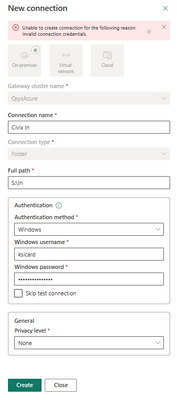
Next I'm trying to configure automatic refreshes. The problem comes from when I go into the refresh settings and add the data connections to the gateway. Using my Windows credentials that are the same for the data gateway/log in to the machine I receive the below error that wont let me add the connection to the gateway within Power BI Service. Even if I bypass the credentials with the checkbox it does not allow refreshes from Power BI service.


Please let me know if anyone can point me in the right direction.

ksicard2430_0-1689280303316.png


5 REPLIES 5
GilbertQ
Super User
Super User

Hi @ksicard2430 


When connecting can you make sure to use the DomainName\username and see if that works?


Did I answer your question? Mark my post as a solution!

Proud to be a Super User!


Power BI Blog

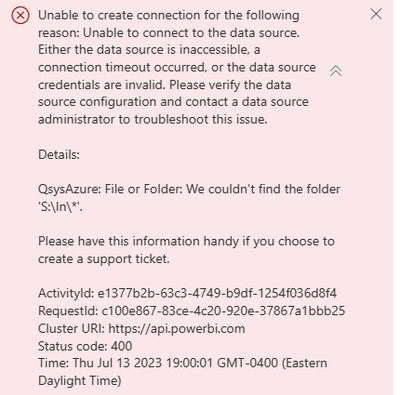
I used the domain/username and it returned a different error. Why can it not find the folder (which is a mapped drive from a different infrastructure)? The Power BI report on the desktop has no issue connecting to the same mapped drive.


ksicard2430_0-1689289352944.png


Can you log into the Gateway server and make sure that you can connect to the S:\ location successfully?


Did I answer your question? Mark my post as a solution!

Proud to be a Super User!


Power BI Blog

I'll add that I just downloaded and installed the personal mode gateway. It's refreshing without issue now. Any ideas on why the standard gateway is having issues?

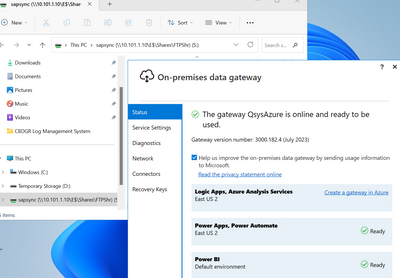
Yes the S: drive which is mapped from another infrastructure is accessible on the server that I installed the on-premise gateway on. 


ksicard2430_0-1689345501428.png


Helpful resources

Announcements
Power BI DataViz World Championships

Power BI Dataviz World Championships

The Power BI Data Visualization World Championships is back! Get ahead of the game and start preparing now!

December 2025 Power BI Update Carousel

Power BI Monthly Update - December 2025

Check out the December 2025 Power BI Holiday Recap!

FabCon Atlanta 2026 carousel

FabCon Atlanta 2026

Join us at FabCon Atlanta, March 16-20, for the ultimate Fabric, Power BI, AI and SQL community-led event. Save $200 with code FABCOMM.