Join us at FabCon Atlanta from March 16 - 20, 2026, for the ultimate Fabric, Power BI, AI and SQL community-led event. Save $200 with code FABCOMM.
Register now!Get Fabric Certified for FREE during Fabric Data Days. Don't miss your chance! Request now
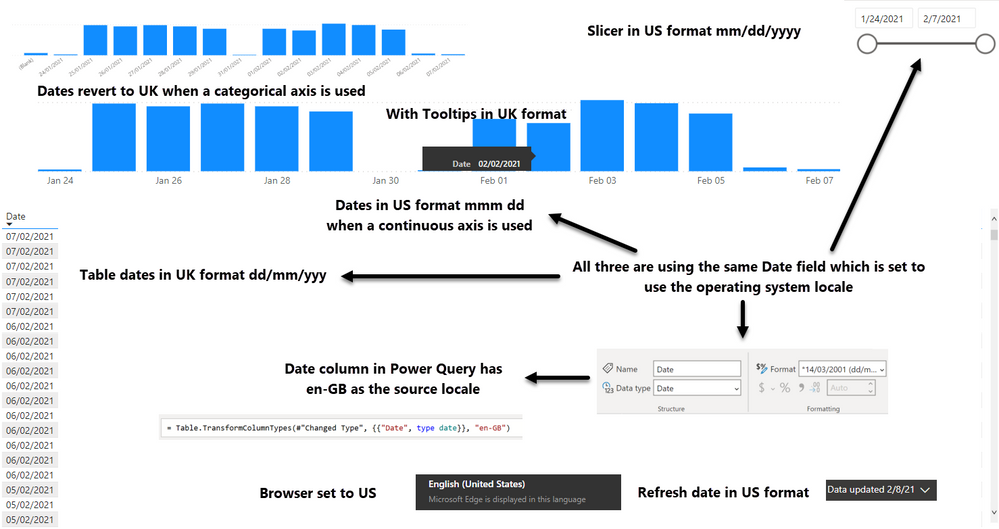
I have a report that will be viewed by staff in the US and the UK. Staff in the US need to see dates in their format i.e. mm/dd/yy. Staff in the UK need to see dates in their format i.e. dd/mm/yy . I have set the report up to use the browser locale. However only certain elements change based on the locale. The slicer correctly changes. Charts change (as long as a continuous axis is used, switching to categorical axis switches the dates back to the UK). Dates in tables refuse to change and so on
I used Power BI Desktop Version: 2.88.1385.0 64-bit (December 2020) to create the reports. All dates are displayed in UK format when viewed in Power BI Desktop. This matches my device locale. The Desktop Regional Settings are set to use English (UK) for import as that matches the source data.
Mixture of UK and US dates when the browser is set to US
Hi @buildbod ,
This is a similar case to your question, someone has already reported this issue on the "Issues" forum
You can check this case link, hope it helps you:
https://community.powerbi.com/t5/Desktop/Relative-Dates-Start-Monday/m-p/1651271#M661553
Best Regards,
Liu Yang
If this post helps, then please consider Accept it as the solution to help the other members find it more quickly.
I would say that they are different issues. Different visuals are processing locale differently. This should not happen. Dates should be handled consistently. What can be done to solve the issue?
Also the Workspace is set to use the 'Default (browser language)'
Check out the November 2025 Power BI update to learn about new features.
Advance your Data & AI career with 50 days of live learning, contests, hands-on challenges, study groups & certifications and more!