cancel
Showing results for 
Search instead for 
Did you mean: 

Level up your Power BI skills this month - build one visual each week and tell better stories with data! Get started

Reply
epaez
New Member

Time error in data in automatic refresh

Hi, I have a Power Bi with origin in a postgreSQL database in Azure, some tables has dateTime Fields and I used this to graph the data per day  in the report. 

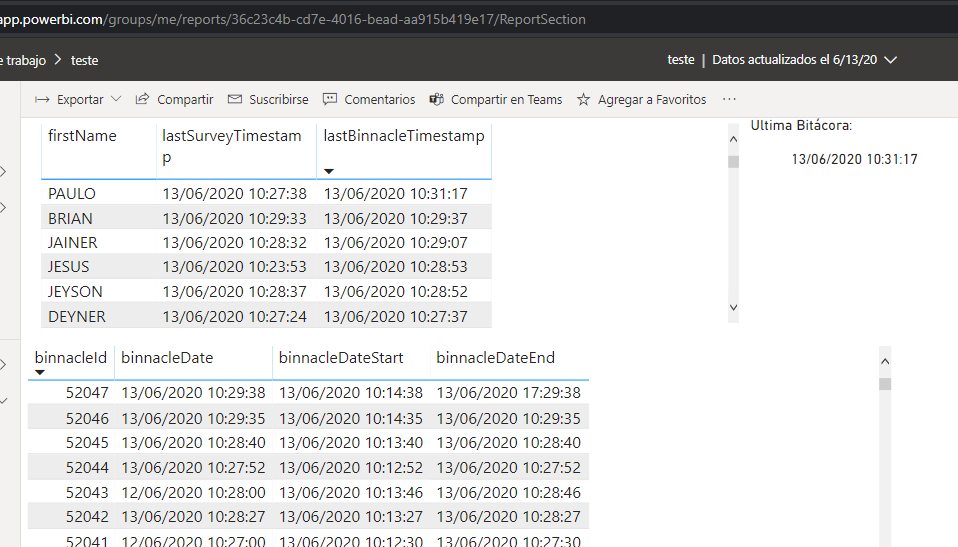
When I update from PowerBi desktop, all runs runs ok and my register and data of today appers good in Power BI web.

But when I update from automatic shedulle, or refresh from the web or using flow (Power Automate), the report increase 5 hours to all the data... that means for example if I have some data of today at 10:21 pm, in the reports updated in automatically way or from the web appears as 15:10 pm, so, all the data registers with dateTime superior to 7:00 pm appers as data for tomorrow date.. somebody knows how to solve? I already try to change the time zone in the automatic refresh setup in web, but doesnt matter what time zone selected, always increase 5 hours to data. (my time zone is GMT-5).


Thanks


Desktop:
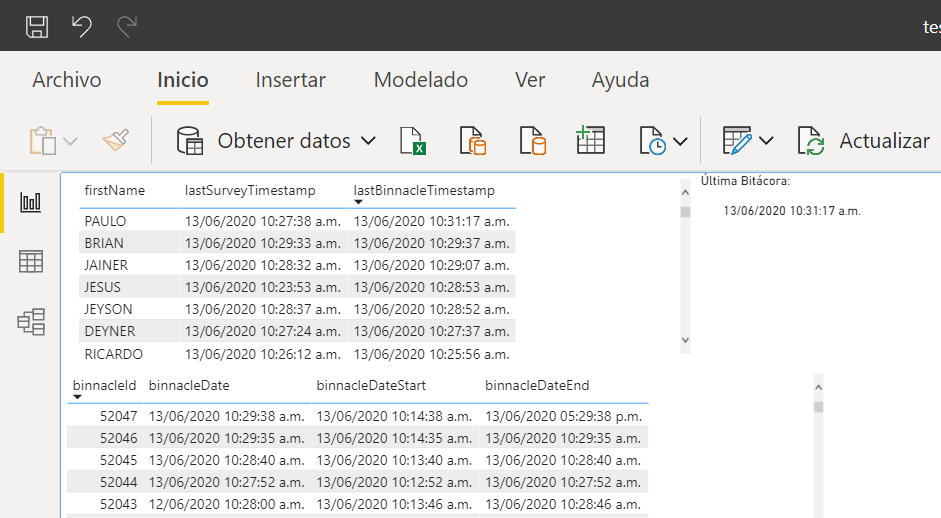
Screen Shot 06-13-20 at 10.44 AM.PNG


Web (updated from Desktop)

Screen Shot 06-13-20 at 10.46 AM.PNG


Web (Updated from web) or with Automatic Refresh Schedulled active
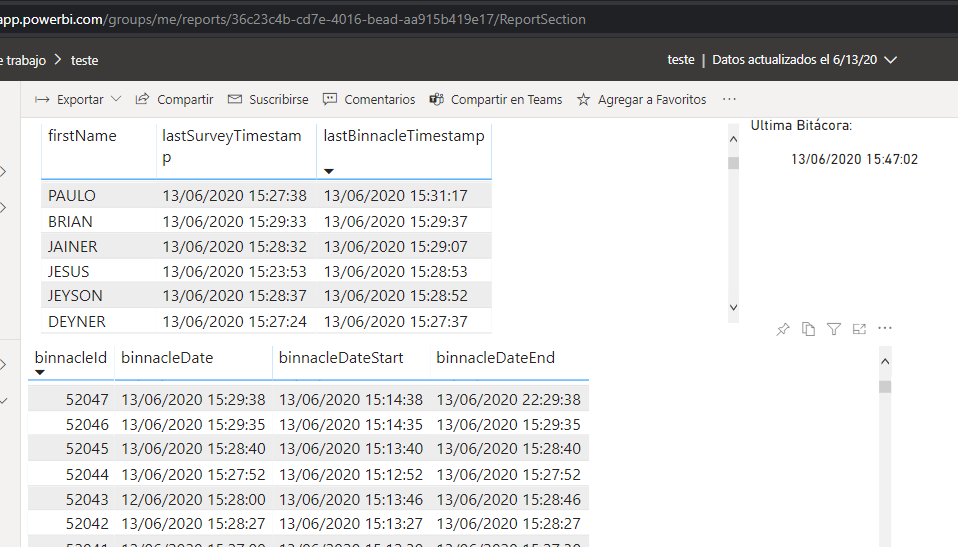
Screen Shot 06-13-20 at 10.53 AM.PNG


1 ACCEPTED SOLUTION
v-xicai
Community Support
Community Support

Hi @epaez ,


You may enter into Query Editor, go to Add column ->Custom column,  adjust the timezone for the DateTime field using DateTimeZone.SwitchZone function in the new created column. Then select on this column, navigate to Transform tab, choose data type and select Date/Time/TimeZone, and click "Close & Apply".


DateTimeZone.SwitchZone(DateTime.AddZone([DateKey], 0),-5 , 0)

TimeZone.png


You can learn more:


https://community.powerbi.com/t5/Desktop/Convert-UTC-to-client-time-zones/td-p/56337

                                     https://community.powerbi.com/t5/Desktop/Convert-UTC-to-local-time-zone-in-DAX/td-p/43328

                                    https://radacad.com/solving-dax-time-zone-issue-in-power-bi


Best Regards,

Amy 


Community Support Team _ Amy

If this post helps, then please consider Accept it as the solution to help the other members find it more quickly.

View solution in original post

1 REPLY 1
v-xicai
Community Support
Community Support

Hi @epaez ,


You may enter into Query Editor, go to Add column ->Custom column,  adjust the timezone for the DateTime field using DateTimeZone.SwitchZone function in the new created column. Then select on this column, navigate to Transform tab, choose data type and select Date/Time/TimeZone, and click "Close & Apply".


DateTimeZone.SwitchZone(DateTime.AddZone([DateKey], 0),-5 , 0)

TimeZone.png


You can learn more:


https://community.powerbi.com/t5/Desktop/Convert-UTC-to-client-time-zones/td-p/56337

                                     https://community.powerbi.com/t5/Desktop/Convert-UTC-to-local-time-zone-in-DAX/td-p/43328

                                    https://radacad.com/solving-dax-time-zone-issue-in-power-bi


Best Regards,

Amy 


Community Support Team _ Amy

If this post helps, then please consider Accept it as the solution to help the other members find it more quickly.

Helpful resources

Announcements
April Power BI Update Carousel

Power BI Monthly Update - April 2026

Check out the April 2026 Power BI update to learn about new features.

Fabric SQL PBI Data Days

Data Days 2026 coming soon!

Sign up to receive a private message when registration opens and key events begin.

New to Fabric survey Carousel

New to Fabric Survey

If you have recently started exploring Fabric, we'd love to hear how it's going. Your feedback can help with product improvements.

Power BI DataViz World Championships carousel

Power BI DataViz World Championships - June 2026

A new Power BI DataViz World Championship is coming this June! Don't miss out on submitting your entry.