Join us at FabCon Atlanta from March 16 - 20, 2026, for the ultimate Fabric, Power BI, AI and SQL community-led event. Save $200 with code FABCOMM.
Register now!The Power BI Data Visualization World Championships is back! Get ahead of the game and start preparing now! Learn more
Hi,
I imported my budget into PowerBI from a SharePoint Library.
One of the columns is the spent value, it is in curency format.
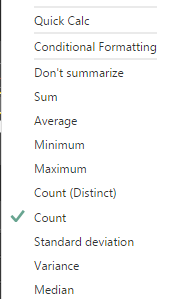
Whenever I try to analyze this column in a dashboard, only "Number" and "Distinct number" are available for display, no "sum", "average" etc.
What could cause such a behaviour ?
Thanks.
Solved! Go to Solution.
Please make sure the currency column values are numeric which can be aggregated but not Text. Only when you use a non-aggregated filed as numeric field, you will only be able to set it to Count or Distinct count. Please refer to this document.
Best Regards,
Herbert
What you select as your calculation in your report design?
Check out the November 2025 Power BI update to learn about new features.
Advance your Data & AI career with 50 days of live learning, contests, hands-on challenges, study groups & certifications and more!