cancel
Showing results for 
Search instead for 
Did you mean: 

The Power BI Data Visualization World Championships is back! Get ahead of the game and start preparing now! Learn more

Reply
Tishchenko
Responsive Resident
Responsive Resident

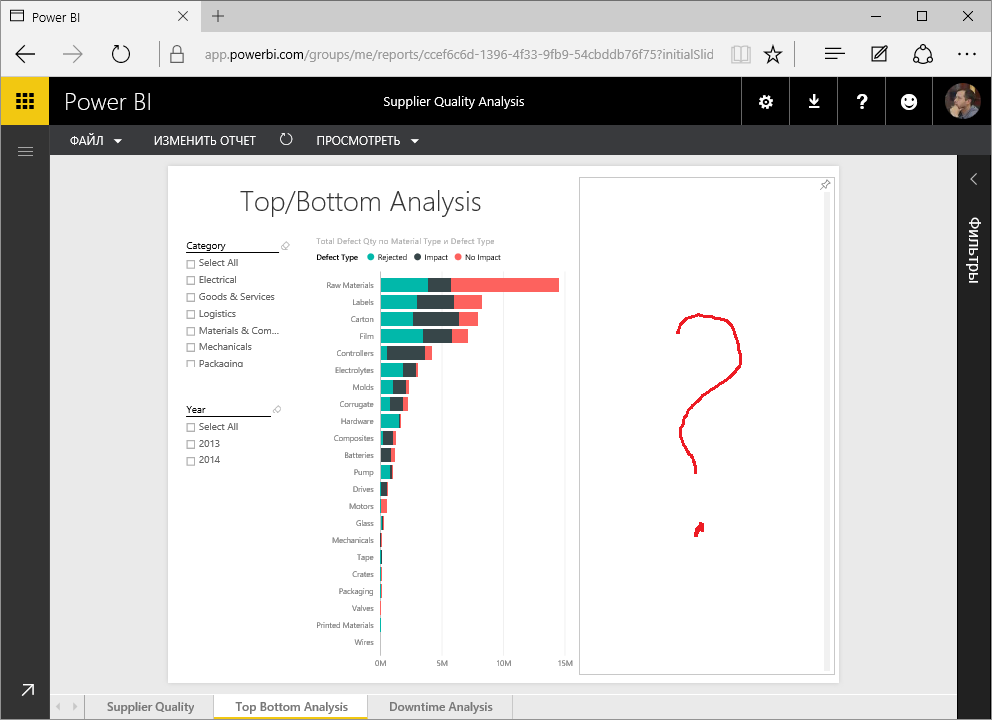
Table or tablix not render in reports whith PageView="Fit to width"

Table or tablix not render in reports whith PageView="Fit to width"

How to reproduce bug:

1. Connent to new standart sample "Supplier quality analysis".

2. Select PageVew = "Fit to width" in all report pages and save.

3. Resize browser (Edge, Chrome) to smaler window for exmple about 800x600.

4. Open report and see this:


pv1.png


pv2.png

3 REPLIES 3
aparodi
Frequent Visitor

I have the same issue. In my Power BI Desktop work fine, but when i deploy the Report, the tables not shown


Please, I need an urgent solution for this.


Regards

Hi,


Someone can help me with this issue.

This is a big problem for all.

Regards

RonEllisGaut
Advocate I
Advocate I

I have the same issue and it is a serious problem for me. A workaround is to to into edit mode in Power BI Web and resize the control. By shrink the tablix below a certain size, it will display again and you can set the size back to what you want. I have also seen this problem with tables. We really need a fix for this because the problem will reoccur on refresh, or sometimes on a vertical scroll action.

Helpful resources

Announcements
November Power BI Update Carousel

Power BI Monthly Update - November 2025

Check out the November 2025 Power BI update to learn about new features.

Fabric Data Days Carousel

Fabric Data Days

Advance your Data & AI career with 50 days of live learning, contests, hands-on challenges, study groups & certifications and more!

FabCon Atlanta 2026 carousel

FabCon Atlanta 2026

Join us at FabCon Atlanta, March 16-20, for the ultimate Fabric, Power BI, AI and SQL community-led event. Save $200 with code FABCOMM.

Top Solution Authors