This time we’re going bigger than ever. Fabric, Power BI, SQL, AI and more. We're covering it all. You won't want to miss it.
Learn moreLevel up your Power BI skills this month - build one visual each week and tell better stories with data! Get started
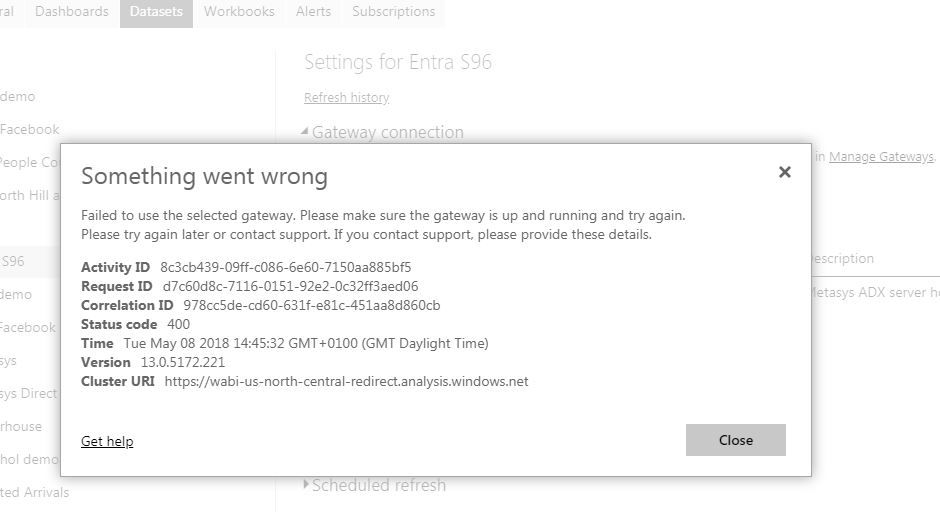
I have a connection to a remote SQL server data-source which works OK in PBI Desktop. I can add the data-source to the gateway in 'Manage Geteways' and the connection is successful. However, when I try to use the on-prem gateway for my datasource it fails with the unhelpful error "Something went wrong...", and a status code of 400. I have restarted the gateway service several times to no avail. I have turned on 'additional logging' but that doesn't show anything. Can anyone suggest why this might be failing, or advise how I can get more diagnostics?
Thanks for the support Xiaoxin.
I have been through the gateway logs with 'additional logging' enabled and there are no errors reported.
I have installed Fiddler on the server - I presume that I have to use HTTPS Mode in the gateway for the data to be captured by Fiddler, so I have done this. Fiddler shows the various tunnels being set up, but other than that I don't see anything significant. When I try to apply the gateway connection to the dataset in PBI settings then I don't see any activity in Fiddler, but then I'm not 100% certain what I should expect to see.
In PBI settings everything still looks OK until I try to apply the gateway to the dataset: the gateway is online and connection tests are successful; in the Dataset settings I can see that the gateway is available and online, but when I try to apply it then I get the 'status code 400' error.
I am at a loss to know what else I can check...
Alan.
Check out the April 2026 Power BI update to learn about new features.
Sign up to receive a private message when registration opens and key events begin.
If you have recently started exploring Fabric, we'd love to hear how it's going. Your feedback can help with product improvements.
| User | Count |
|---|---|
| 11 | |
| 8 | |
| 8 | |
| 7 | |
| 7 |
| User | Count |
|---|---|
| 50 | |
| 27 | |
| 24 | |
| 23 | |
| 22 |