cancel
Showing results for 
Search instead for 
Did you mean: 

The Power BI Data Visualization World Championships is back! Get ahead of the game and start preparing now! Learn more

Reply
TomaszLuchowski
Frequent Visitor

Slicers with "Search" enabled rendered incorrectly in powerbi.com

Hello,


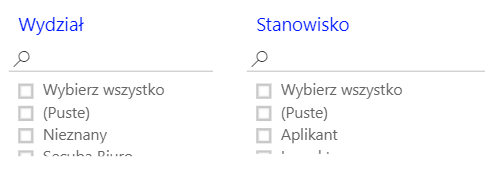
We noticed that since a few days, slicers with "Search" option enabled are displayed incorrectly in powerbi.com. The report looks perfectly fine in PowerBI Desktop, and looked fine in powerbi.com too until a couple of days ago.


When I disable "Search" option, it's render perfectly again.


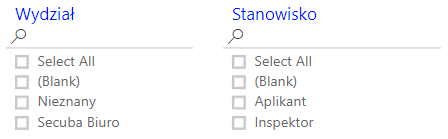
In PowerBI Desktop:


desktop.png


In Powerbi.com:

service.PNG


Kind regards

Tomasz


2 REPLIES 2
v-juanli-msft
Community Support
Community Support

Hi @TomaszLuchowski

It seems the werid thing happening in the power bi service is the language of the character in the slicer, right?

It shows the polish, the West Slavic language of Poland in power bi service from your screenshot.

Please see this article to learn what language is supported and how to change the language in power bi service.

Choose your language in the Power BI service

  1. Select the Settings icon Setting Icon> Settings in the Power BI service.
  2. On the General tab > Languages .
  3. Choose your language> Apply .


Best Regards

Maggie


Dear Maggie,


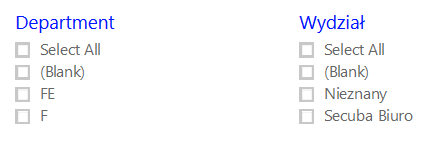
I've changed the language to English as you suggested, but the issue remains:

1.png

When I disable "Search" option on the slicer, it's rendered perfectly again:

2.png

I've tried both in Chrome and Firefox.


Kind regards

Tomasz

Helpful resources

Announcements
Power BI DataViz World Championships

Power BI Dataviz World Championships

The Power BI Data Visualization World Championships is back! Get ahead of the game and start preparing now!

December 2025 Power BI Update Carousel

Power BI Monthly Update - December 2025

Check out the December 2025 Power BI Holiday Recap!

FabCon Atlanta 2026 carousel

FabCon Atlanta 2026

Join us at FabCon Atlanta, March 16-20, for the ultimate Fabric, Power BI, AI and SQL community-led event. Save $200 with code FABCOMM.