Join us at FabCon Atlanta from March 16 - 20, 2026, for the ultimate Fabric, Power BI, AI and SQL community-led event. Save $200 with code FABCOMM.
Register now!Get Fabric Certified for FREE during Fabric Data Days. Don't miss your chance! Request now
Hello,
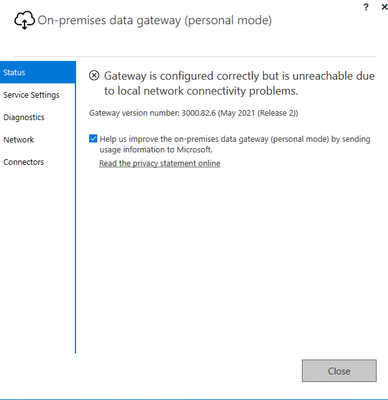
Updated our on-premise gateway last week to 3000.82.6 (May 2021 (Release 2)) immediately our dataflows failed and our gateway displayed the attached message - "Gateway is configured correctly but is unreachable due to local network connectivity problems".
Solved! Go to Solution.
This issue was resolved by uninstalling, and then reinstalling the personal gateways. Potentially the updates were run off an old/outdated link.
Thank you @Greg_Deckler... This issue doesn't appear in the trouble shooting or the community posts. I'll post where you suggested. Still hoping that maybe someone else has seen this and knows how to resolve quickly.
@harbour_service Have you been through this? Troubleshoot gateways - Power BI | Microsoft Docs
You could check the Issues forum here:
https://community.powerbi.com/t5/Issues/idb-p/Issues
And if it is not there, then you could post it.
If you have Pro account you could try to open a support ticket. If you have a Pro account it is free. Go to https://support.powerbi.com. Scroll down and click "CREATE SUPPORT TICKET".
Check out the November 2025 Power BI update to learn about new features.
Advance your Data & AI career with 50 days of live learning, contests, hands-on challenges, study groups & certifications and more!