cancel
Showing results for 
Search instead for 
Did you mean: 

Level up your Power BI skills this month - build one visual each week and tell better stories with data! Get started

Reply
DairyG1
Helper I
Helper I

SharePoint - Visualise the list

Hello All,


hope you can advise.

I have a sharepoint list and used the visualise the list option.


I would like to make changes but dont have the edit button on the ribbon and i have a PBI pro license.

Anyone know why?


Thank you

7 REPLIES 7
ponnusamy
Solution Supplier
Solution Supplier

@DairyG1 :  Do you get the option called "Publish to the list"?

@ponnusamy  - Hi, yes i have that option.

I even published back to sharepoint list to see if that would activate the edit button but it didn't.

I checked my licensing and have the PRO license.


Thanks


@DairyG1 : It could be due to permission. Can you confirm that you have contributor role to the sharepoint site?

@ponnusamy - Thanks for the response.

I have full permission on the sharepoint site.

All other users have contribute.


ive no idea why i dont have an edit button.

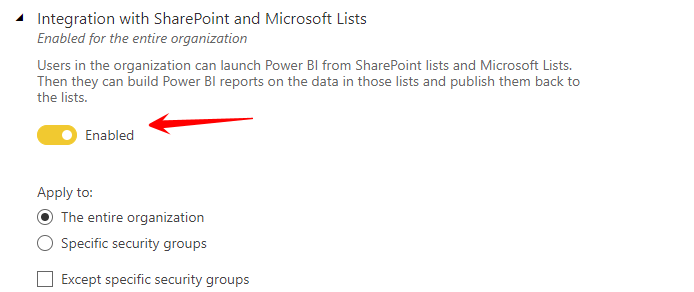
@DairyG1 : It looks like the tenant settings for "Integration with Sharepoint and Microsoft Lists" is not enabled for your tenant. If you are tenant admin,  check the setting as shown in the following screen. 

ponnusamy_0-1632141540347.png


if you are not the admin, ask the admin to use the following link and enable the setting.


https://app.powerbi.com/admin-portal/tenantSettings


If this post helps, then please consider Accepting it as the solution, Give Kudos to motivate the contributors.

@ponnusamy  Thank you for your help on this.

Is the above printscreen from Power BI or Sharepoint?


@DairyG1 : The screen shot is from 'tenant setting admin view' . Click the link I had provided , that will take you or the admin to the screen.

Helpful resources

Announcements
April Power BI Update Carousel

Power BI Monthly Update - April 2026

Check out the April 2026 Power BI update to learn about new features.

Fabric SQL PBI Data Days

Data Days 2026 coming soon!

Sign up to receive a private message when registration opens and key events begin.

New to Fabric survey Carousel

New to Fabric Survey

If you have recently started exploring Fabric, we'd love to hear how it's going. Your feedback can help with product improvements.

Power BI DataViz World Championships carousel

Power BI DataViz World Championships - June 2026

A new Power BI DataViz World Championship is coming this June! Don't miss out on submitting your entry.