cancel
Showing results for 
Search instead for 
Did you mean: 

Vote for your favorite vizzies from the Power BI Dataviz World Championship submissions. Vote now!

Reply
Anonymous
Not applicable

Share PowerBI Reports (in addition to Dashboards) in my organisation

Hi PBI, My PBI contains 10 tabs. I have pinned tab#1 to the Dashboard, while the remaing 9 tabs remains on the report.. I noticed when I share with my colleagues, they can see only what I have pinned to Dashboard. What are the steps I need to undertake so my colleagues can view the remaining 9 tabs (if I choose not to pin on the dashboard.


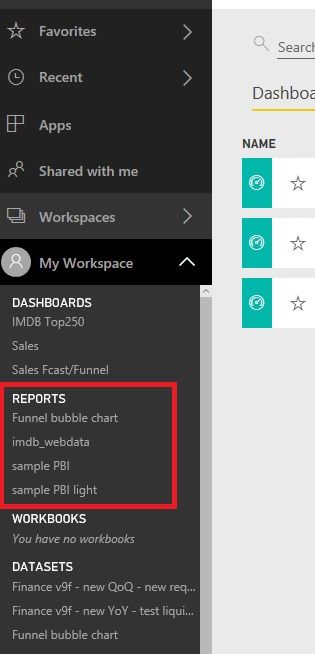
Attached is a Picture on my PowerBI. However, My colleagues do not have any on the reports I have highligted in RED.. ThankyouUntitled.jpg

2 ACCEPTED SOLUTIONS
v-ljerr-msft
Microsoft Employee
Microsoft Employee

Hi @Anonymous,


In your scenario, you can try creating an App or content pack, include the report and publish it to other users within your organization. For more details, you can refer to the following articles. Smiley Happy

https://powerbi.microsoft.com/en-us/documentation/powerbi-service-create-apps/

https://powerbi.microsoft.com/en-us/documentation/powerbi-service-organizational-content-pack-tutorial-create-and-publish/


Regards

View solution in original post

Anonymous
Not applicable

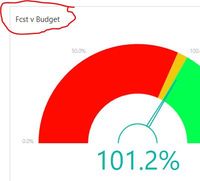
Capture.JPGjust worked out - by clicking on the file name (red) .. it takes the viewer to the whole report

View solution in original post

2 REPLIES 2
v-ljerr-msft
Microsoft Employee
Microsoft Employee

Hi @Anonymous,


In your scenario, you can try creating an App or content pack, include the report and publish it to other users within your organization. For more details, you can refer to the following articles. Smiley Happy

https://powerbi.microsoft.com/en-us/documentation/powerbi-service-create-apps/

https://powerbi.microsoft.com/en-us/documentation/powerbi-service-organizational-content-pack-tutorial-create-and-publish/


Regards

Anonymous
Not applicable

Capture.JPGjust worked out - by clicking on the file name (red) .. it takes the viewer to the whole report

Helpful resources

Announcements
Power BI DataViz World Championships

Power BI Dataviz World Championships

Vote for your favorite vizzies from the Power BI World Championship submissions!

Sticker Challenge 2026 Carousel

Join our Community Sticker Challenge 2026

If you love stickers, then you will definitely want to check out our Community Sticker Challenge!

January Power BI Update Carousel

Power BI Monthly Update - January 2026

Check out the January 2026 Power BI update to learn about new features.

FabCon Atlanta 2026 carousel

FabCon Atlanta 2026

Join us at FabCon Atlanta, March 16-20, for the ultimate Fabric, Power BI, AI and SQL community-led event. Save $200 with code FABCOMM.