This time we’re going bigger than ever. Fabric, Power BI, SQL, AI and more. We're covering it all. You won't want to miss it.
Learn moreDid you hear? There's a new SQL AI Developer certification (DP-800). Start preparing now and be one of the first to get certified. Register now
Hello Everyone
I have a group where i have stored my excel or DOC files. I want to set permission to these files in such a way that only few people can edit and rest all can only view the files?
Any Idea or sugesstion please share asap.
I have tried setting read access for my group but it didnt worked for me.
Thanks
Rajendra
Solved! Go to Solution.
Hi @rj1120,
Based on your description, you add files to your Power BI group and want to restrict permission for group members, right? How do you perform the whole process?
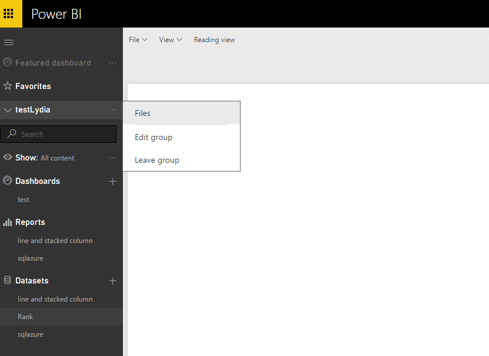
Based on my test, after you click “Files” from the following similar screenshot, firstly, you can set read-only permission to the uploaded files for group members using the following steps.
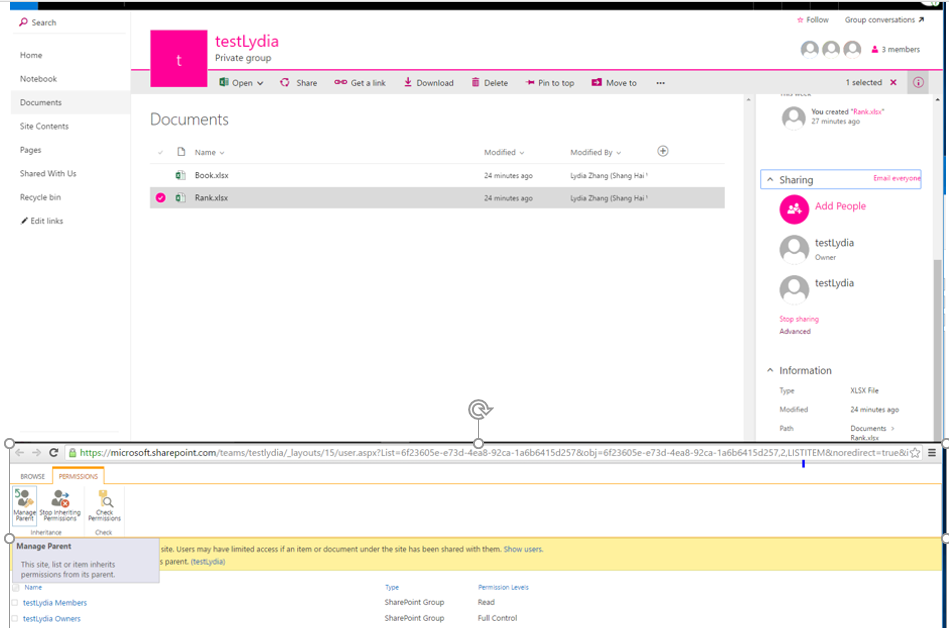
1. Click the file you want to set permission, choose Advanced under Sharing option in details panel, then click “Manage Parent” button.
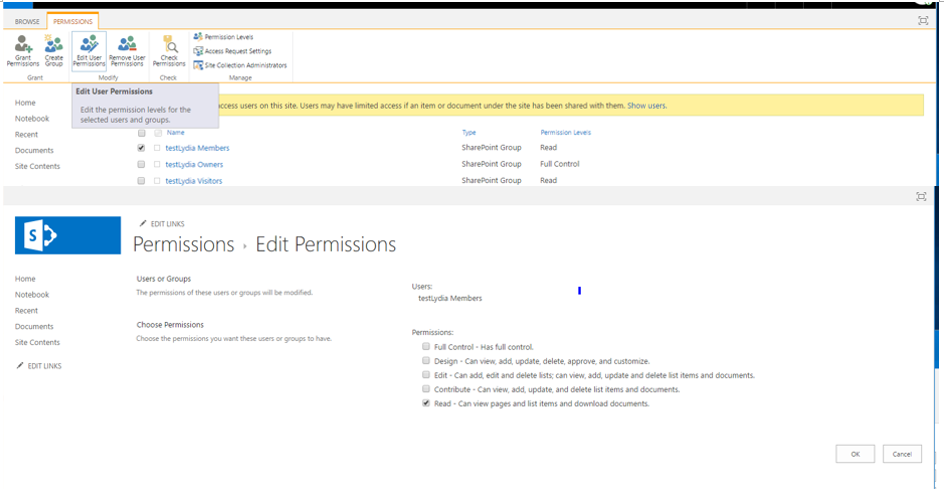
2. Choose your group members, click “Edit permission” and grant read permission for members.
After performing the above steps, the group members can only view the files.
Secondly, you can edit your group in Power BI and select “Members can only view Power BI content” option to restrict permission for your members. For more details, please review this article.
Thanks,
Lydia Zhang
Hi @rj1120,
Based on your description, you add files to your Power BI group and want to restrict permission for group members, right? How do you perform the whole process?
Based on my test, after you click “Files” from the following similar screenshot, firstly, you can set read-only permission to the uploaded files for group members using the following steps.
1. Click the file you want to set permission, choose Advanced under Sharing option in details panel, then click “Manage Parent” button.
2. Choose your group members, click “Edit permission” and grant read permission for members.
After performing the above steps, the group members can only view the files.
Secondly, you can edit your group in Power BI and select “Members can only view Power BI content” option to restrict permission for your members. For more details, please review this article.
Thanks,
Lydia Zhang
Check out the April 2026 Power BI update to learn about new features.
Sign up to receive a private message when registration opens and key events begin.
If you have recently started exploring Fabric, we'd love to hear how it's going. Your feedback can help with product improvements.
| User | Count |
|---|---|
| 10 | |
| 8 | |
| 7 | |
| 7 | |
| 7 |
| User | Count |
|---|---|
| 49 | |
| 27 | |
| 21 | |
| 20 | |
| 20 |