I know there was an issue in June with the NULL field and not being calculated properly, but it seems to still exist, at least in the service.
I have the following M code in a table:
let
    Source = ARALTADR,
    #"Filtered Rows" = Table.SelectRows(Source, each ([Customer Number] = "BED100" or [Customer Number] = "BED200")),
    #"Removed Other Columns" = Table.SelectColumns(#"Filtered Rows",{"Customer Number", "Alternate Address", "Pool Facility Codes"}),
    #"Filtered out nulls" = Table.SelectRows(#"Removed Other Columns", each ([Pool Facility Codes] <> null)),
    #"Merged Queries" = Table.NestedJoin(#"Filtered out nulls", {"Pool Facility Codes"}, tblBBBPoolFacilityCodes, {"FacilityCode"}, "tblBBBPoolFacilityCodes", JoinKind.LeftAnti),
    #"Expanded tblBBBPoolFacilityCodes" = Table.ExpandTableColumn(#"Merged Queries", "tblBBBPoolFacilityCodes", {"FacilityCode"}, {"FacilityCode"}),
    #"Removed Other Columns1" = Table.SelectColumns(#"Expanded tblBBBPoolFacilityCodes",{"Customer Number", "Alternate Address", "Pool Facility Codes"})
in
    #"Removed Other Columns1"
The third row is removing nulls from a text field. In the desktop app (June 2019) it works fine, but when I publish to the service, that filter is being ignored and is returning all records.
They clearly show as null in the Power Query editor on the desktop.
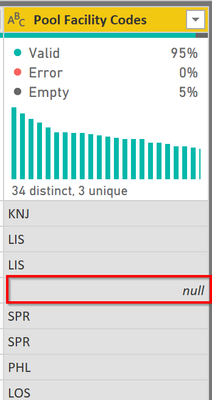
I changed my query to this, which moves the null filtering after the join (less efficient, but wanted to test it)
let
    Source = ARALTADR,
    #"Filtered Rows" = Table.SelectRows(Source, each ([Customer Number] = "BED100" or [Customer Number] = "BED200")),
    #"Removed Other Columns" = Table.SelectColumns(#"Filtered Rows",{"Customer Number", "Alternate Address", "Pool Facility Codes"}),
    #"Merged Queries" = Table.NestedJoin(#"Removed Other Columns", {"Pool Facility Codes"}, tblBBBPoolFacilityCodes, {"FacilityCode"}, "tblBBBPoolFacilityCodes", JoinKind.LeftOuter),
    #"Expanded tblBBBPoolFacilityCodes" = Table.ExpandTableColumn(#"Merged Queries", "tblBBBPoolFacilityCodes", {"FacilityCode"}, {"FacilityCode"}),
    #"Filtered Rows1" = Table.SelectRows(#"Expanded tblBBBPoolFacilityCodes", each ([Pool Facility Codes] <> null) and ([FacilityCode] = null)),
    #"Removed Other Columns1" = Table.SelectColumns(#"Filtered Rows1",{"Customer Number", "Alternate Address", "Pool Facility Codes"})
in
    #"Removed Other Columns1"
And the service still ignores the <> null filter.
I finally applied the text type again to the Pool Facility Code field above and that caused it to work correctly in the service. I thought this was all resolved last month?
Did I answer your question? Mark my post as a solution!Did my answers help arrive at a solution? Give it a kudos by clicking the Thumbs Up!DAX is for Analysis. Power Query is for Data Modeling
Proud to be a Super User!
MCSA: BI Reporting





