cancel
Showing results for 
Search instead for 
Did you mean: 

The Power BI Data Visualization World Championships is back! Get ahead of the game and start preparing now! Learn more

Reply
Anonymous
Not applicable

Service Auto-Sorting visual incorrectly

I am having trouble with the service automatically changing the sorting on certain visuals regardless of preset, saved, or structured sorting done on the Desktop or Service. On the desktop in my Date table my QTR field is sorted by a QTR_num column which it is sorted by. I have also sorted this visual using the elipses to specifically select 'sort by QTR'. The visual works fine on the desktop and never re-sorts itself or changes sorting.


The problem is on the Service for some reason, no matter how I sort the visual, once I switch back to 'Reading' mode the visual auto-sorts to a different field. I've re-saved the visual with my desired sorting multiple times, I've tried republishing the whole report multiple times, nothing is working.


View on the desktop (displaying correctly):


sort-desktop.png


After publishing to the Service (change occurs?):
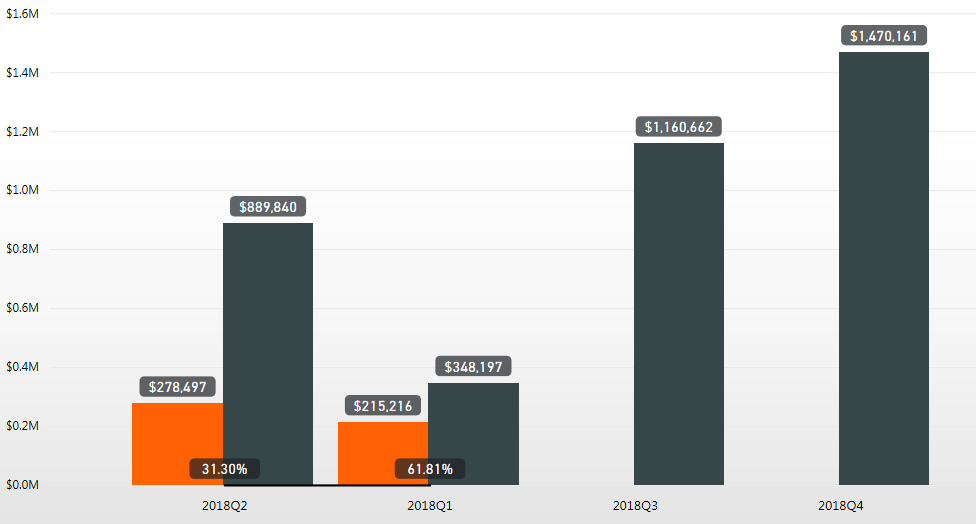
 

sort-service-error.png


Go into "Edit report" to try to force visual to sort correctly:
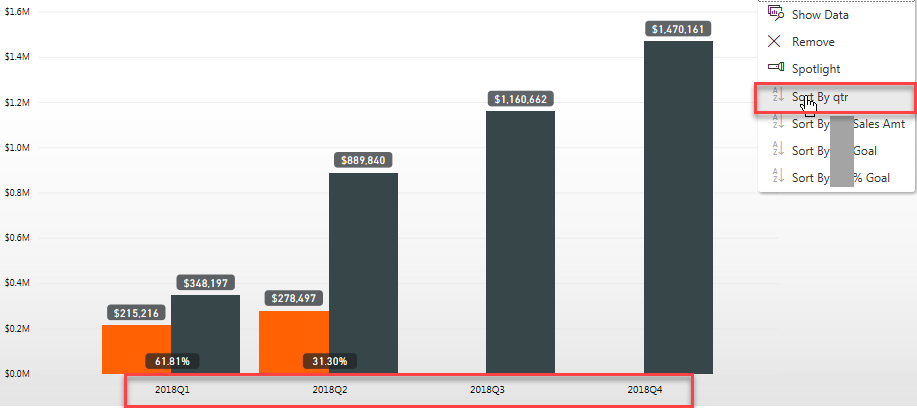


sort-service-fixattempt.png


I click "Save" and then once I select "Reading View" the visual goes back to the incorrect sorting:
 

sort-service-erroragain.png


 Why wont Power BI service recognize the way the visual should sort? I'm at my wits end trying to fix this and it is occurring on multiple visuals.


5 REPLIES 5
GilbertQ
Super User
Super User

Hi there

I would suggest creating a Sort By Column in your data model. This will then always allow your data to be sorted correctly.

https://docs.microsoft.com/en-us/power-bi/desktop-sort-by-column


Did I answer your question? Mark my post as a solution!

Proud to be a Super User!


Power BI Blog

Anonymous
Not applicable

@GilbertQ

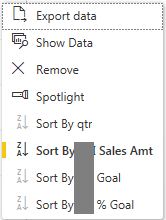
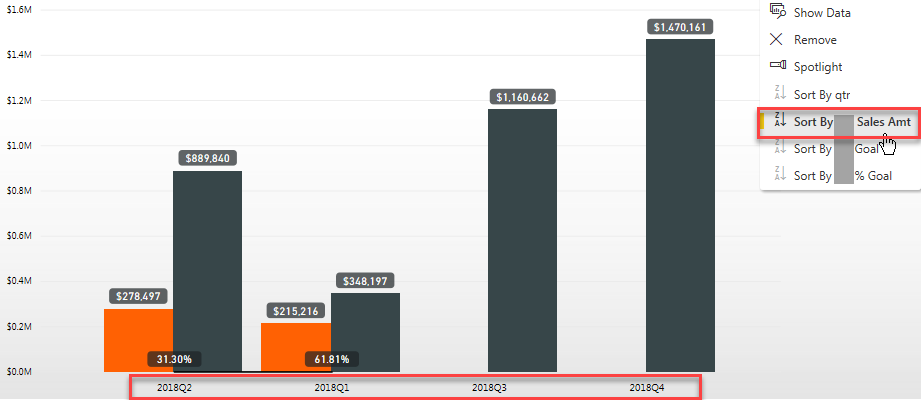
There is a sort by column as well in my data model that I'm sorting by. For some reason the Service is automatically selecting a different sorting method in the visualsort-selection.PNG

It is automatically selecting the 'Sort By ___ Sales Amt' field which I do not have selected anywhere while on the desktop. 

Anonymous
Not applicable

HI @Anonymous,


Have you try to sort by column feature to specific 'qty' column as sort order of 'amount' column?


Regards,

Xiaoxin Sheng

Anonymous
Not applicable

@Anonymous

I'm sorry, I'm not entirely sure what you're asking me. I am trying to specifically sort by column 'qtr' which is set as my sorting method on the desktop both in my data model as well as on the visual.


Could you clarify your question please? Thanks for responding

Anonymous
Not applicable

HI @Anonymous,


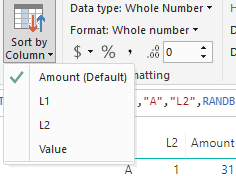
I just means you can try to setting amount column as the sort order column of qty column.(normally column use itself as sort order column)

12.PNG


Regards,

Xiaoxin Sheng

Helpful resources

Announcements
Power BI DataViz World Championships

Power BI Dataviz World Championships

The Power BI Data Visualization World Championships is back! Get ahead of the game and start preparing now!

December 2025 Power BI Update Carousel

Power BI Monthly Update - December 2025

Check out the December 2025 Power BI Holiday Recap!

FabCon Atlanta 2026 carousel

FabCon Atlanta 2026

Join us at FabCon Atlanta, March 16-20, for the ultimate Fabric, Power BI, AI and SQL community-led event. Save $200 with code FABCOMM.