cancel
Showing results for 
Search instead for 
Did you mean: 

The Power BI Data Visualization World Championships is back! Get ahead of the game and start preparing now! Learn more

Reply
Anonymous
Not applicable

Sensitivity Label in Excel causes refresh error ( Data source error ) in Power BI Service

Hi all!


I've created a report in Power BI Desktop using various sources (all in Excel file, but with different connection properties e.g. from Web or Sharepoint Folder),


A main source for the report are Excel files sent daily to Outlook automatically and a Flow saves them into a Sharepoint Folder.


The report itself works fine, and updates fine in Desktop, but as soon as I publish the report to the Service, refresh option stops working and returns an error that data is corrupted
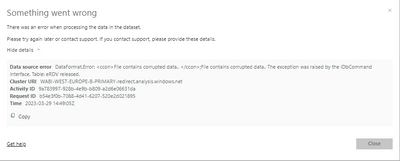
Ali_Shakh_0-1680102907709.png

It took me a while to realize (trial and errors) that the issue is in Sensitivity Label of Excel files I received,

as soon as I open them, choose a label and save a file everything works fine.
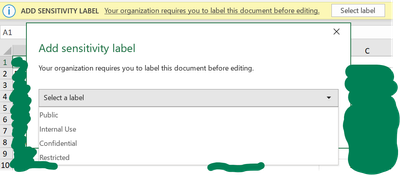
Ali_Shakh_1-1680104081106.png

Opening each file manually and selecting a label isn't an option (the whole idea of this report was to automate everything).

I tried to fool Power BI doing the following =>
in PQ before "Invoke Custom Function" I made a Sorting, so when the function runs and takes a first file (which I openned and selected a label) as a parameter for others the whole refresh issue will disapear, but...
as you can see, in that case only those that had labes are openned properly, other files have errors 

Ali_Shakh_2-1680104478175.png

so, does anyone know how to solve this problem?

1 ACCEPTED SOLUTION
Anonymous
Not applicable

UPD:
after some trial and error I figured out the workaround, just replaced all Excel files with CSV and now all is good, it's kinda weird that there is no solution for Excel

View solution in original post

1 REPLY 1
Anonymous
Not applicable

UPD:
after some trial and error I figured out the workaround, just replaced all Excel files with CSV and now all is good, it's kinda weird that there is no solution for Excel

Helpful resources

Announcements
November Power BI Update Carousel

Power BI Monthly Update - November 2025

Check out the November 2025 Power BI update to learn about new features.

Fabric Data Days Carousel

Fabric Data Days

Advance your Data & AI career with 50 days of live learning, contests, hands-on challenges, study groups & certifications and more!

FabCon Atlanta 2026 carousel

FabCon Atlanta 2026

Join us at FabCon Atlanta, March 16-20, for the ultimate Fabric, Power BI, AI and SQL community-led event. Save $200 with code FABCOMM.

Top Solution Authors