Join us at FabCon Atlanta from March 16 - 20, 2026, for the ultimate Fabric, Power BI, AI and SQL community-led event. Save $200 with code FABCOMM.
Register now!Vote for your favorite vizzies from the Power BI Dataviz World Championship submissions. Vote now!
I want to know how the shared workspace user previliges are given?There are 2 options
1)Members can edit PowerBI content
2)Members can only view Power BI content.
And there are two options when I add the users
1)Admin.
2) Member.
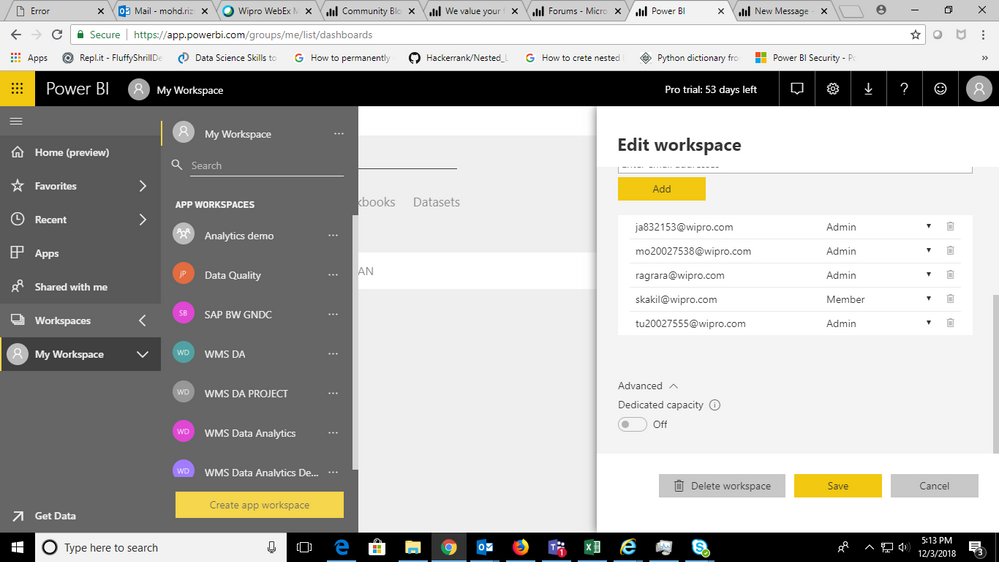
I want to khow how it works.I am attaching the screenshot.I want to know how th combination of
1)Members can edit PowerBI content
Works with
Admin,Member.
2)Members can only view Power BI content.
Works with Admin,Member.
Please let me know the solution.
Solved! Go to Solution.
Hi @Anonymous,
Based on my research, If you have set below condition:
Members can edit PowerBI content
Whatever the roles of the members(Member or Admin), they could view and edit the report.
If you have set this condition:
Members can only view Power BI content
The Admin role could view and edit the report and the Member role could only view the report.
Regards,
Daniel He
Hi @Anonymous,
Could you please tell me if your problem has been solved? If it is, could you please mark the helpful replies as Answered to close this topic?
Regards,
Daniel He
Hi @Anonymous,
Based on my research, If you have set below condition:
Members can edit PowerBI content
Whatever the roles of the members(Member or Admin), they could view and edit the report.
If you have set this condition:
Members can only view Power BI content
The Admin role could view and edit the report and the Member role could only view the report.
Regards,
Daniel He
If you love stickers, then you will definitely want to check out our Community Sticker Challenge!
Check out the January 2026 Power BI update to learn about new features.
| User | Count |
|---|---|
| 20 | |
| 10 | |
| 9 | |
| 8 | |
| 7 |
| User | Count |
|---|---|
| 51 | |
| 42 | |
| 30 | |
| 27 | |
| 25 |