Join us at FabCon Atlanta from March 16 - 20, 2026, for the ultimate Fabric, Power BI, AI and SQL community-led event. Save $200 with code FABCOMM.
Register now!Get Fabric Certified for FREE during Fabric Data Days. Don't miss your chance! Request now
Hi,
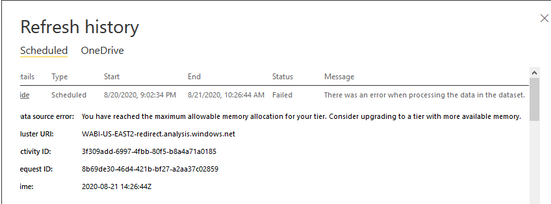
I have a dataset refresh job scheduled at 9 pm yesterday. And today when I checked the refresh history, the job ran through the night for more than 12 hours. I'm wondering how could this happen? How can I solve the issue?
Thank you,
Kelly
Hi @Anonymous ,
Please refresh the same report in Power BI desktop and check if more CPU and memory consumed during refresh.
You can check if there is any measure or calculated column defined in the report, please try to remove one by one to check which might causes memory issue.
Also please try to optimized your data model based follow: https://docs.microsoft.com/en-us/power-bi/power-bi-reports-performance#optimize-your-model
https://www.sqlbi.com/articles/capturing-power-bi-queries-using-dax-studio/
Best Regards,
Liang
If this post helps, then please consider Accept it as the solution to help the other members find it more quickly.
@Anonymous - Well, the short answer is you ran out of memory in the Service. Not really enough information to go on, please first check if your issue is a common issue listed here: https://community.powerbi.com/t5/Community-Blog/Before-You-Post-Read-This/ba-p/1116882
Also, please see this post regarding How to Get Your Question Answered Quickly: https://community.powerbi.com/t5/Community-Blog/How-to-Get-Your-Question-Answered-Quickly/ba-p/38490
The most important parts are:
1. Sample data as text, use the table tool in the editing bar
2. Expected output from sample data
3. Explanation in words of how to get from 1. to 2.
Check out the November 2025 Power BI update to learn about new features.
Advance your Data & AI career with 50 days of live learning, contests, hands-on challenges, study groups & certifications and more!