cancel
Showing results for 
Search instead for 
Did you mean: 

July 7 - July 17 | Round 2 of the Power BI Dataviz World Championships. Don't miss your chance! Learn more

Reply
alexumagba
Frequent Visitor

Schedule refresh failed

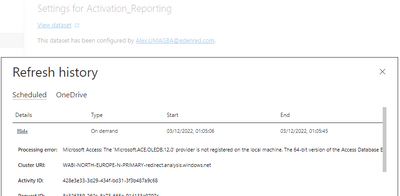
I have this error Microsoft Access: The 'Microsoft.ACE.OLEDB.12.0' provider is not registered on the local machine. The 64-bit version of the Access Database Engine OLEDB provider may be required to read this type of file. To download the client software, visit the following site: https://go.microsoft.com/fwlink/?LinkID=285987.

alexumagba_0-1670029894967.png


7 REPLIES 7
Anonymous
Not applicable

Hi @alexumagba ,


Power BI supports importing or connecting to workbooks created in Excel 2007 and later. Workbooks must be saved as .xlsx or .xlsm file type and be under 1 GB. Some features described in this article are only available in later versions of Excel.

More details: Get data from Excel workbook files 


You can follow any of below :

1. Update your source file to .xlsx (Change the file suffix instead of simply renaming it).

2. Configure a gateway and install 64bit version of Microsoft.ACE.OLEDB.12.0 on gateway server, then create a data source for your source file (even it's on SharePoint) and use that to refresh your dataset.


Are your xlsx files saved in SharePoint? Please refer to this document and it may be helpful for you.

I found some similar posts for you, you can also refer to the solutions of the following posts.

Solved: MS Access dataset on Sharepoint - "Microsoft.ACE.O... - Microsoft Power BI Community

Solved: MS Access in Share Point issue - Microsoft Power BI Community

Solved: There was an error when processing the data in the... - Microsoft Power BI Community


Best Regards,

Neeko Tang

If this post helps, then please consider Accept it as the solution to help the other members find it more quickly. 

alexumagba
Frequent Visitor

None of my data sources are xlsb. They are xlsx and access.

Access is the same as xlsb  (requires the driver to be installed on the gateway)

please how do I install the driver on the gateway

Anonymous
Not applicable

Hi @alexumagba ,


Has your problem been solved? If the problem has been solved you can mark the reply for the standard answer to help the other members find it more quickly. If not, please point it out. Thanks in advance.


Best Regards,

Neeko Tang

If this post helps, then please consider Accept it as the solution  to help the other members find it more quickly. 
the same way you would install it on a regular PC.  To download the client software, visit the following site: https://go.microsoft.com/fwlink/?LinkID=285987.

lbendlin
Super User
Super User

Don't use XLSB files as your data source.  Use XLSX or XLSM.

Helpful resources

Announcements
FabCon and SQLCon Barcelona 2026

FabCon & SQLCon – Barcelona 2026

Join us in Barcelona for FabCon and SQLCon, the Fabric, Power BI, SQL, and AI community event. Save €200 with code FABCMTY200.

60 days of Data Days Carousel

Data Days 2026

Join Fabric Data Days 2026: 60 days of free live/on-demand sessions, challenges, study groups, and certification opportunities.

Power BI DataViz World Championships carousel

Power BI DataViz World Championships - June 2026

A new Power BI DataViz World Championship is coming this June! Don't miss out on submitting your entry.