
cancel
Showing results for 
Search instead for 
Did you mean: 

The Power BI Data Visualization World Championships is back! Get ahead of the game and start preparing now! Learn more

Reply
kk0036
Helper I
Helper I

Row Level Security with Username() with b2b accounts

Previously when I used this as my RLS filter the Username function returned Users@userdomain.com for all of my b2b users. Now when I add and external user username() and userprinciplename() return the external version User_Userdomain.com#ext#mydomain.com. I just want to know why that might occur and if I can go back to having it return just the email in invited rather than the entire extension. 

5 REPLIES 5
GilbertQ
Super User
Super User

Hi @kk0036


From my testing, when you use the USERPRINCIPALNAME() function with B2B it should still return the external email address which should then map through to your table where you have got the email address stored.


My understanding is that what is viewed in the Azure AD Display Name, but that is not what is returned by the USERPRINCIPALNAME() function 


Did I answer your question? Mark my post as a solution!

Proud to be a Super User!


Power BI Blog

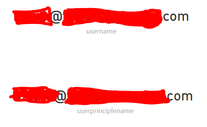
I have tested too with 6 users from 3 domains with one user being newly added and one user being old. I get this long form email address now for username() and userprinciplename() for any b2b user that I add. I created a testing workspace with measures to show what the Username and UPN are for each user. I then signed in as those users to view this page, and for users added prior to yesterday both return just the email address username@userdomain.com and for any users added yesterday or after I get the ext version. 


So both functions now return the email address in the long form, and the old users still return the normal email address even when they are in the same external domain as the new users I added. 


I figured I would share a screenshot of the results in the testing report. These are two users from the same domain with different results for the username() and userprinciplename() functions. The top user was added last week, bottom user added yesterday. 

user 1.png

User 2.png

Hi there,

Could it be that it takes Azure AD a few days to sort out the email address, or possibly that someone changed it in Azure AD?


Did I answer your question? Mark my post as a solution!

Proud to be a Super User!


Power BI Blog

It hasn't lagged like this before. Typically I am able to add users to power bi reports within hours of the request. 


As I am really the only person that does this activity, I don't think that the user account would have been changed by anyone else. 


I did something just for a test. I had an account that was added as an external user test. It was working appropriately with the username() function returning the user@domain.com. I removed that account from office 365 and my AD and reinvited. Upon re-entering the username() and userprinciplename() function returned with the #EXT#. 

Helpful resources

Announcements
November Power BI Update Carousel

Power BI Monthly Update - November 2025

Check out the November 2025 Power BI update to learn about new features.

Fabric Data Days Carousel

Fabric Data Days

Advance your Data & AI career with 50 days of live learning, contests, hands-on challenges, study groups & certifications and more!

FabCon Atlanta 2026 carousel

FabCon Atlanta 2026

Join us at FabCon Atlanta, March 16-20, for the ultimate Fabric, Power BI, AI and SQL community-led event. Save $200 with code FABCOMM.

Top Solution Authors