This is best Fabric, Power BI, SQL and AI community event. How do we know? The last event sold out! Save €200 with code FABCMTY200.
Register nowA new Data Days event is coming soon! This time we’re going bigger than ever. Fabric, Power BI, SQL, AI and more. Don't miss out.
Hi All,
I am new to Power BI . I have a question here.
If we have a report deployed in Production environment and we need to do the changes to that. Assume some kind of fix. What is the procedure to do that. How to get the report from Prod env and do the changes and then re deploy.
Regards,
Abhi
Solved! Go to Solution.
Hey @Anonymous
Assuming that you use "Publish" from Power BI Desktop, just use the pbix that you have used to publish initially, add / fix what has to be added / fixed and redeploy again.
As there currently is no "ALM" solution that helps to build deployment pipelines across different environments I always make copies of the pbix file and start working on the copies.
Basically I rename the origin of the copying and publish from a pbix that always has the same name to avoid clutter of reports.
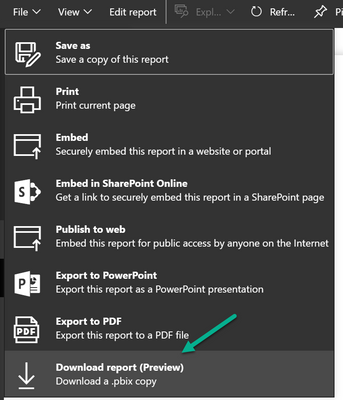
If the "pbix" has changed in the meantime, you can use the function from "Download report (Preview)", but this will only work if the report originates from a published pbix file.
Regards,
Tom
Hey @Anonymous
Assuming that you use "Publish" from Power BI Desktop, just use the pbix that you have used to publish initially, add / fix what has to be added / fixed and redeploy again.
As there currently is no "ALM" solution that helps to build deployment pipelines across different environments I always make copies of the pbix file and start working on the copies.
Basically I rename the origin of the copying and publish from a pbix that always has the same name to avoid clutter of reports.
If the "pbix" has changed in the meantime, you can use the function from "Download report (Preview)", but this will only work if the report originates from a published pbix file.
Regards,
Tom
Check out the May 2026 Power BI update to learn about new features.
Sign up to receive a private message when registration opens and key events begin.
If you have recently started exploring Fabric, we'd love to hear how it's going. Your feedback can help with product improvements.
| User | Count |
|---|---|
| 10 | |
| 9 | |
| 9 | |
| 7 | |
| 6 |
| User | Count |
|---|---|
| 31 | |
| 25 | |
| 24 | |
| 20 | |
| 18 |