Join us at FabCon Atlanta from March 16 - 20, 2026, for the ultimate Fabric, Power BI, AI and SQL community-led event. Save $200 with code FABCOMM.
Register now!The Power BI Data Visualization World Championships is back! Get ahead of the game and start preparing now! Learn more
Hi All,
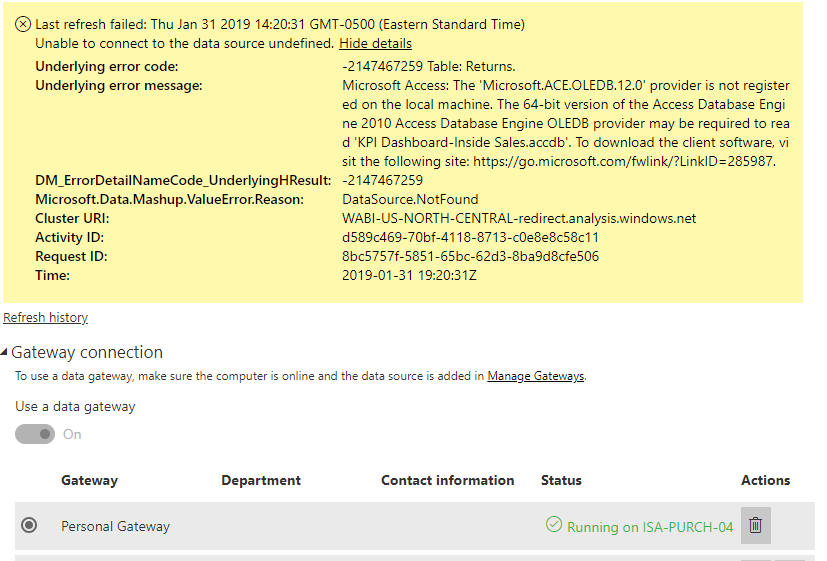
I am attempting to refresh a report on the Service portal I published from the Desktop app, but I receive the following error message:
As you can see, I have set up a personal gateway connection, but the error message is quite odd since I am using the 32-bit 2016 Access (Power Bi is 32-bit as well) and I already have the appropriate database engine downloaded for it.
Any suggestions would be much appreciated, thanks!!
Hi @Anonymous,
Based on my research, could you please make sure that you install the correct bit version of Power BI Desktop, also ensure that the Microsoft Access Database Engine 2010 Redistributable you install matches the bitness of Power BI Desktop. You could also refer to below issue:
https://community.powerbi.com/t5/Desktop/Get-data-from-an-Access-DB/td-p/31250
Regards,
Daniel He
The Power BI Data Visualization World Championships is back! Get ahead of the game and start preparing now!