cancel
Showing results for 
Search instead for 
Did you mean: 

Join the FabCon + SQLCon recap series. Up next: Power BI, Real-Time Intelligence, IQ and AI, and Data Factory take center stage. All sessions are available on-demand after the live show. Register now

Reply
sean0121
Regular Visitor

Refresh failure with error code 2147467259

Hi, I've been getting this error message when refresh reports in PowerBI service.


  • Underlying error code-2147467259
  • Underlying error messageGoogleAnalytics failed to get the response: 'The underlying connection was closed: An unexpected error occurred on a send.'.

Refreshing was working fine in PowerBI desktop but only having issue once being published.


I also found that if I delete the append steps in Power Query, refreshing is working. 


Basically I'm importing data with Filtered Cube from Google Analytics and append it with histrocial static data which is stored in our SQL database.


Any help would be appreciated.

2 REPLIES 2
QueryWhiz
Post Patron
Post Patron

Hi @sean0121 I know this reply is very late lol but were you able to find a solution? I used the GA native connector but had some issues with my data sometimes. As a workardound, maybe you can try to test your connection with a 3rd party connector. I've tried windsor.ai, supemetrics (which doesn't have PBI as a destination, so you first have to export to Google Sheets and then export to PBI) and funnel.io. I stayed with windsor because it is much cheaper so just to let you know other options. In case you wonder, to make the connection first search for the GA connector in the data sources list:


GA-1.png


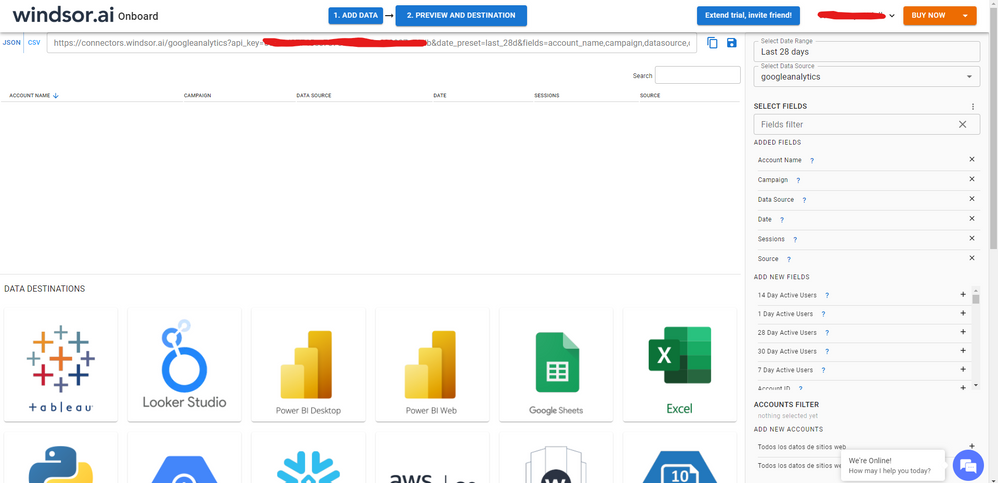
After that, just grant access to your GA account using your credentials, then on preview and destination page you will see a preview of your GA fields:


GA-2.png


There just select the fields you need. Finally, just select PBI as your data destination and finally just copy and paste the url on PBI --> Get Data --> Web --> Paste the url.


SELECT_DESTINATION_NEW.png


v-yinliw-msft
Community Support
Community Support

Hi @sean0121 ,


Could you please check your Gateway version? 

Make sure the gateway is up to date.


Hope this helps you.


Best Regards,

Community Support Team _Yinliw

If this post helps, then please consider Accept it as the solution to help the other members find it more quickly.

Helpful resources

Announcements
April Power BI Update Carousel

Power BI Monthly Update - April 2026

Check out the April 2026 Power BI update to learn about new features.

New to Fabric survey Carousel

New to Fabric Survey

If you have recently started exploring Fabric, we'd love to hear how it's going. Your feedback can help with product improvements.

Power BI DataViz World Championships carousel

Power BI DataViz World Championships - June 2026

A new Power BI DataViz World Championship is coming this June! Don't miss out on submitting your entry.

FabCon and SQLCon Highlights Carousel

FabCon & SQLCon Highlights

Experience the highlights from FabCon & SQLCon, available live and on-demand starting April 14th.