Learn from the best! Meet the four finalists headed to the FINALS of the Power BI Dataviz World Championships! Register now
Hello
For some time we've been experiencing error that occurs caused by failed refreshing of dataset:
The operation was throttled by Power BI Premium because there were too many datasets being processed concurrently
I've been wondering, if switching from many datasets for every report to one dataflow per workspace, may reduce memory usage, ergo, getting rid of this error
Solved! Go to Solution.
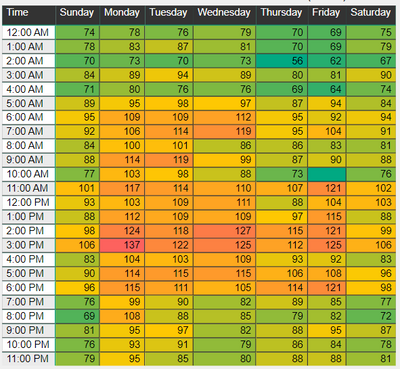
Not really. It's more of a function of only refreshing datasets when the source data changes (API based refresh) or moving your refresh schedule around to utilize the half hour slots and the less busy times. The capacity health template has enough data so you can create a heatmap page that shows you the refresh requests per slot and day of week like so:
You will also want to single out the longest running refreshes and work with the developers to reduce the query duration and/or frequency.
Not really. It's more of a function of only refreshing datasets when the source data changes (API based refresh) or moving your refresh schedule around to utilize the half hour slots and the less busy times. The capacity health template has enough data so you can create a heatmap page that shows you the refresh requests per slot and day of week like so:
You will also want to single out the longest running refreshes and work with the developers to reduce the query duration and/or frequency.
If you have recently started exploring Fabric, we'd love to hear how it's going. Your feedback can help with product improvements.
A new Power BI DataViz World Championship is coming this June! Don't miss out on submitting your entry.
Share feedback directly with Fabric product managers, participate in targeted research studies and influence the Fabric roadmap.