FabCon is coming to Atlanta
Join us at FabCon Atlanta from March 16 - 20, 2026, for the ultimate Fabric, Power BI, AI and SQL community-led event. Save $200 with code FABCOMM.
Register now!- Power BI forums
- Get Help with Power BI
- Desktop
- Service
- Report Server
- Power Query
- Mobile Apps
- Developer
- DAX Commands and Tips
- Custom Visuals Development Discussion
- Health and Life Sciences
- Power BI Spanish forums
- Translated Spanish Desktop
- Training and Consulting
- Instructor Led Training
- Dashboard in a Day for Women, by Women
- Galleries
- Data Stories Gallery
- Themes Gallery
- Contests Gallery
- QuickViz Gallery
- Quick Measures Gallery
- Visual Calculations Gallery
- Notebook Gallery
- Translytical Task Flow Gallery
- TMDL Gallery
- R Script Showcase
- Webinars and Video Gallery
- Ideas
- Custom Visuals Ideas (read-only)
- Issues
- Issues
- Events
- Upcoming Events
The Power BI Data Visualization World Championships is back! Get ahead of the game and start preparing now! Learn more
- Power BI forums
- Forums
- Get Help with Power BI
- Service
- Refresh Fails - More Recent Gateway
- Subscribe to RSS Feed
- Mark Topic as New
- Mark Topic as Read
- Float this Topic for Current User
- Bookmark
- Subscribe
- Printer Friendly Page

- Mark as New
- Bookmark
- Subscribe
- Mute
- Subscribe to RSS Feed
- Permalink
- Report Inappropriate Content
Refresh Fails - More Recent Gateway
Hello - I have one scheduled job running on my Personal Gateway fail with error - FailedThis refresh issue was fixed in a more recent version of the Gateway. Please install the latest version. I've updated to the more recent version this morning (Gateway version number: 3000-14-39 (November 2019)) and still fails. Strange thing is I've got several other jobs that are running with no errors. The three Data Sources I have are .csv files stored on my Personal OnShare Drive.
Below is the full error message.
Any suggestions ???
Thanks
Mike
DetailsTypeStartEndStatusMessage
Hide
On demand12/13/2019, 10:17:43 AM12/13/2019, 10:17:47 AMFailedThis refresh issue was fixed in a more recent version of the Gateway. Please install the latest version.
Cluster URI: WABI-SOUTH-CENTRAL-US-redirect.analysis.windows.net
Activity ID: 6a4052e3-8555-4540-ac58-fe84ee6f779b
Request ID: b6d45c34-1c1d-e7dd-78e8-44af4a44bb90
Time: 2019-12-13 15:17:47Z
Show
On demand11/20/2019, 9:26:40 AM11/20/2019, 9:26:45 AMFailedThis refresh issue was fixed in a more recent version of the Gateway. Please install the latest version.
Show
On demand11/20/2019, 9:03:52 AM11/20/2019, 9:03:52 AMFailedScheduled refresh has been disabled.
Show
On demand11/20/2019, 8:21:12 AM11/20/2019, 8:21:19 AMFailedThis refresh issue was fixed in a more recent version of the Gateway. Please install the latest version.
Show
On demand11/15/2019, 9:16:11 AM11/15/2019, 9:16:18 AMFailedThis refresh issue was fixed in a more recent version of the Gateway. Please install the latest version.
Show
On demand11/14/2019, 8:01:36 AM11/14/2019, 8:02:03 AMFailedThis refresh issue was fixed in a more recent version of the Gateway. Please install the latest version.
Show
On demand11/12/2019, 4:41:31 PM11/12/2019, 4:41:37 PMFailedThis refresh issue was fixed in a more recent version of the Gateway. Please install the latest version.
Show
On demand11/12/2019, 4:03:21 PM11/12/2019, 4:03:25 PMFailedThis refresh issue was fixed in a more recent version of the Gateway. Please install the latest version.
Show
On demand11/12/2019, 3:51:49 PM11/12/2019, 3:52:01 PMFailedThis refresh issue was fixed in a more recent version of the Gateway. Please install the latest version.
Show
Scheduled11/3/2019, 7:30:33 AM11/3/2019, 7:43:04 AMFailedYour data gateway (personal mode) is offline or couldn't be reached.
Show
Scheduled11/2/2019, 8:31:32 AM11/2/2019, 8:44:54 AMFailedYour data gateway (personal mode) is offline or couldn't be reached.
Show
On demand11/1/2019, 10:11:51 AM11/1/2019, 10:11:57 AMFailedThis refresh issue was fixed in a more recent version of the Gateway. Please install the latest version.
Show
Scheduled11/1/2019, 8:30:33 AM11/1/2019, 8:41:26 AMFailedThis refresh issue was fixed in a more recent version of the Gateway. Please install the latest version.
Show
On demand10/31/2019, 1:06:17 PM10/31/2019, 1:06:23 PMFailedThis refresh issue was fixed in a more recent version of the Gateway. Please install the latest version.
Show
On demand10/31/2019, 8:55:18 AM10/31/2019, 8:55:24 AMFailedThis refresh issue was fixed in a more recent version of the Gateway. Please install the latest version.
Show
On demand10/31/2019, 8:52:47 AM10/31/2019, 8:52:52 AMFailedThis refresh issue was fixed in a more recent version of the Gateway. Please install the latest version.
Show
On demand10/31/2019, 8:34:12 AM10/31/2019, 8:34:22 AMFailedThis refresh issue was fixed in a more recent version of the Gateway. Please install the latest version.
Show
Scheduled10/31/2019, 8:30:33 AM10/31/2019, 8:32:50 AMFailedAn invalid credential due to signature doesn't match. Please check your connection data source credential.
Show
On demand10/30/2019, 2:58:29 PM10/30/2019, 2:58:30 PMFailedYour data gateway (personal mode) is offline or couldn't be reached. Scheduled10/30/2019, 8:30:35 AM10/30/2019, 8:34:47 AMCompleted
Solved! Go to Solution.


- Mark as New
- Bookmark
- Subscribe
- Mute
- Subscribe to RSS Feed
- Permalink
- Report Inappropriate Content
Hi @Anonymous ,
Glad to hear that you have resolved your problem. Thank you for sharing this. If you have any other questions, please kindly ask here and we will try to resolve it.
Best regards,
If this post helps, then please consider Accept it as the solution to help the other members find it more quickly.
- Mark as New
- Bookmark
- Subscribe
- Mute
- Subscribe to RSS Feed
- Permalink
- Report Inappropriate Content
Hi @Anonymous ,
How about the result after you follow the suggestions mentioned in my original post?Could you please provide more details about it If it doesn't meet your requirement?
Best regards,
If this post helps, then please consider Accept it as the solution to help the other members find it more quickly.
- Mark as New
- Bookmark
- Subscribe
- Mute
- Subscribe to RSS Feed
- Permalink
- Report Inappropriate Content
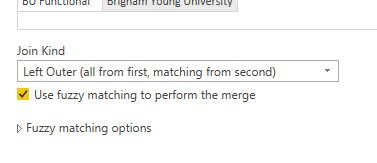
Thanks for all you suggestions - I've tried the new December personal gateway and still failed as well. As the Data credentials and stepping through every single step in the script also did not solved it. However good news - I did stumble upon the solution on my own. It turnes out if was a newer Fuzzy Merge Matching feature that cause the issue. I removed the Fuzzy match check box and the script nows runs to complete on scheduled jobs. Once Unchecked box - User fuzzy matching to perform the merge - it works
Mike
- Mark as New
- Bookmark
- Subscribe
- Mute
- Subscribe to RSS Feed
- Permalink
- Report Inappropriate Content
Hi @Anonymous ,
Glad to hear that you have resolved your problem. Thank you for sharing this. If you have any other questions, please kindly ask here and we will try to resolve it.
Best regards,
If this post helps, then please consider Accept it as the solution to help the other members find it more quickly.
- Mark as New
- Bookmark
- Subscribe
- Mute
- Subscribe to RSS Feed
- Permalink
- Report Inappropriate Content
Hi @Anonymous ,
Could you please try to upload another report with single csv file as data source and test refresh it again? Have you tried to install and use On-Premises Data Gateway (Standard Mode) as a workaround?
Best regards,
If this post helps, then please consider Accept it as the solution to help the other members find it more quickly.


- Mark as New
- Bookmark
- Subscribe
- Mute
- Subscribe to RSS Feed
- Permalink
- Report Inappropriate Content
@Anonymous Do you get any failures if you open the PBIX file and go into Transform Data (Power Query) and refresh any of the quieres? Sometimes I've found that something changed or my settings/permissions on the data source got messsed up in the file and they need updating.
Looking for more Power BI tips, tricks & tools? Check out PowerBI.tips the site I co-own with Mike Carlo. Also, if you are near SE WI? Join our PUG Milwaukee Brew City PUG
- Mark as New
- Bookmark
- Subscribe
- Mute
- Subscribe to RSS Feed
- Permalink
- Report Inappropriate Content
Thanks Seth - I have no problems manually refreshing the dataset from the pbix file directly. Dailey I manually refresh everyday and Publish to the Power BI portal. (sort of a pain ;o)
- Mark as New
- Bookmark
- Subscribe
- Mute
- Subscribe to RSS Feed
- Permalink
- Report Inappropriate Content
@Anonymous My point is I have had files that refresh successfully in the PBIX file, but when i go dig into the query itself I start to see errors. Those errors for some reason got bypassed in the PBIX refresh, but caught in the gateway refresh and failed it. I would recommend checking all your datasource credential settings that you are using in the file, as that appears to be the issue.
File - Options and Settings - Data source settings after checking your PQ queries.
Looking for more Power BI tips, tricks & tools? Check out PowerBI.tips the site I co-own with Mike Carlo. Also, if you are near SE WI? Join our PUG Milwaukee Brew City PUG
Helpful resources

Power BI Dataviz World Championships
The Power BI Data Visualization World Championships is back! Get ahead of the game and start preparing now!

Power BI Monthly Update - December 2025
Check out the December 2025 Power BI Holiday Recap!

FabCon Atlanta 2026
Join us at FabCon Atlanta, March 16-20, for the ultimate Fabric, Power BI, AI and SQL community-led event. Save $200 with code FABCOMM.


| User | Count |
|---|---|
| 48 | |
| 46 | |
| 44 | |
| 16 | |
| 15 |


