Don't miss your chance to take the Fabric Data Engineer (DP-600) exam for FREE! Find out how by attending the DP-600 session on April 23rd (pacific time), live or on-demand.
Learn moreJoin the FabCon + SQLCon recap series. Up next: Power BI, Real-Time Intelligence, IQ and AI, and Data Factory take center stage. All sessions are available on-demand after the live show. Register now
Hello,
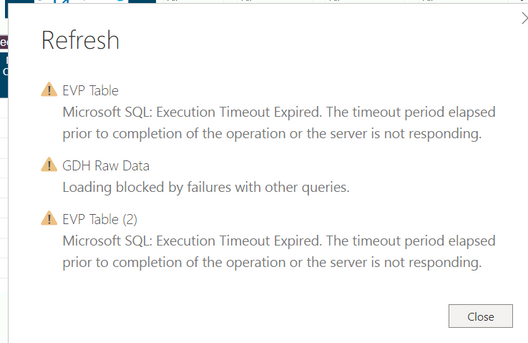
Im getting a PowerBI refresh error, you can find the error in below attached. Can anyone advise about this error.
Thanks,
AkhilIm getting this PowerBI refresh error
Hi. It looks like the data you are getting is taking quite time to respond. It throughs a time out because it's taking to long. By default power query has a 15 minutes for execution. You can increase that in Power Query code. The source step in the query (advance editor or formula bar).
The function has command time out to increase as a duration item: https://docs.microsoft.com/en-us/powerquery-m/sql-databases
You can also do it in the UI when you connect for the first time. Examples:
https://community.powerbi.com/t5/Desktop/How-to-set-command-timeout-option/m-p/487941
I hope that helps,
P/D If the query takes 2 hours it won't refresh, it's a pro license limitation.
Happy to help!
Check out the April 2026 Power BI update to learn about new features.
If you have recently started exploring Fabric, we'd love to hear how it's going. Your feedback can help with product improvements.
A new Power BI DataViz World Championship is coming this June! Don't miss out on submitting your entry.
| User | Count |
|---|---|
| 9 | |
| 8 | |
| 8 | |
| 8 | |
| 8 |
| User | Count |
|---|---|
| 32 | |
| 31 | |
| 20 | |
| 18 | |
| 17 |