cancel
Showing results for 
Search instead for 
Did you mean: 

Data Days is here! Join us now for 60+ days of learning, challenges, and connection. Learn more

Reply
Anonymous
Not applicable

Redshift with Power Query

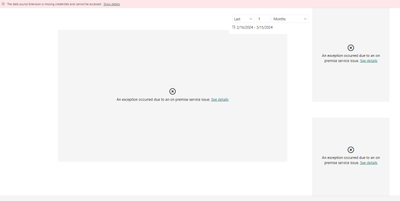
I have set up a Power Query connection with Redshift, however once I upload it to the service I get the following errors. My credentials are correct and I've reentered them several times to the semantic model to no avail. I do not need a Gateway since it's a Redshift connection so I shouldn't have to set one up. I've googled this and can't seem to find the fix. 

2024-03-15_15-21-39.png


1 ACCEPTED SOLUTION
Anonymous
Not applicable

Hi @Anonymous ,

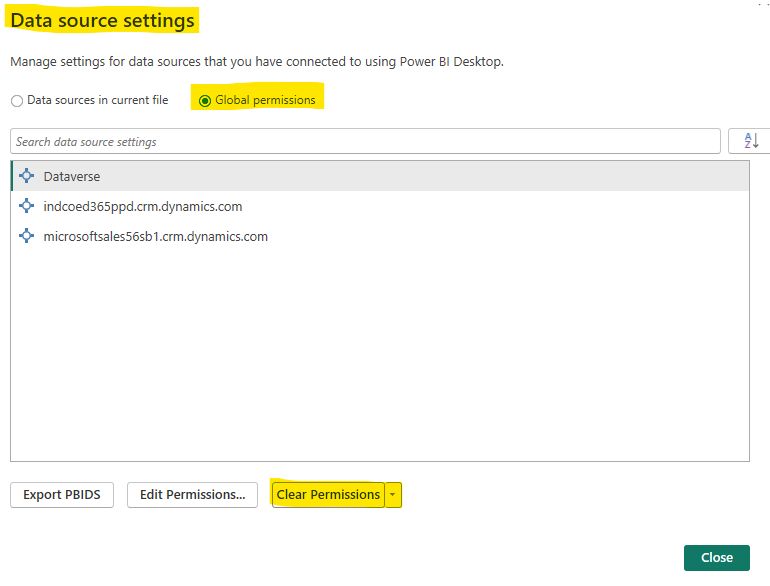
In Power Query Desktop, go to File > Options and Settings > Data Source Settings. Under Global permissions, select any old Amazon Redshift data source connections and click on Clear Permission. Then reconnect to your Redshift database and try it again.
vyilongmsft_1-1711005777831.png

Mazon Redshift has a per-user connection limit. Ensure that you do not have this limit. Also you can check if there are any locks or active transactions on the data source side. Maybe this two documents can help you: Power Query Amazon Redshift connector - Power Query | Microsoft Learn and Solved: redshift Connection (Fatal Error: Too many connect... - Power Platform Community (microsoft....


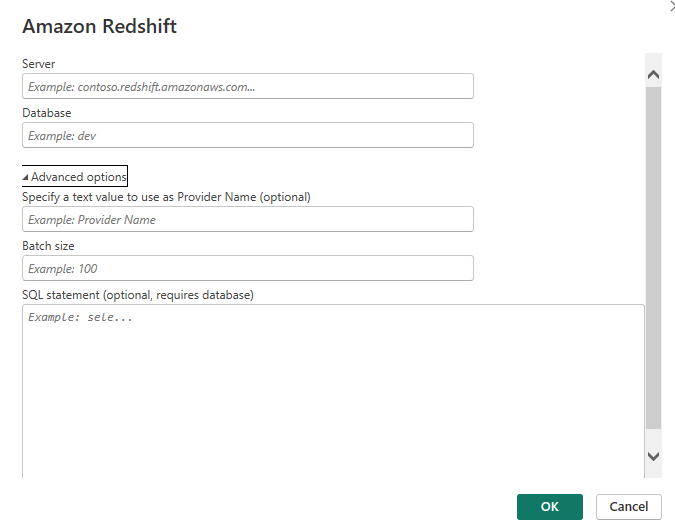
You also need to specify advanced options such as the server port.
vyilongmsft_2-1711006455357.png


Best Regards

Yilong Zhou

If this post helps, then please consider Accept it as the solution to help the other members find it more quickly.

View solution in original post

2 REPLIES 2
Anonymous
Not applicable

Hi @Anonymous ,

In Power Query Desktop, go to File > Options and Settings > Data Source Settings. Under Global permissions, select any old Amazon Redshift data source connections and click on Clear Permission. Then reconnect to your Redshift database and try it again.

vyilongmsft_1-1711005777831.png

Mazon Redshift has a per-user connection limit. Ensure that you do not have this limit. Also you can check if there are any locks or active transactions on the data source side. Maybe this two documents can help you: Power Query Amazon Redshift connector - Power Query | Microsoft Learn and Solved: redshift Connection (Fatal Error: Too many connect... - Power Platform Community (microsoft....


You also need to specify advanced options such as the server port.

vyilongmsft_2-1711006455357.png


Best Regards

Yilong Zhou

If this post helps, then please consider Accept it as the solution to help the other members find it more quickly.
lbendlin
Super User
Super User

If you have a Pro license you can open a Pro ticket at https://admin.powerplatform.microsoft.com/newsupportticket/powerbi
Otherwise you can raise an issue at https://community.fabric.microsoft.com/t5/Issues/idb-p/Issues .

Helpful resources

Announcements
Fabric Data Days is here Carousel

Fabric Data Days 2026

Don't miss out on Data Days, June 15 through August 7. Learn Fabric, Power BI, SQL, AI and more.

May Power BI Update Carousel

Power BI Monthly Update - May 2026

Check out the May 2026 Power BI update to learn about new features.

Power BI DataViz World Championships carousel

Power BI DataViz World Championships - June 2026

A new Power BI DataViz World Championship is coming this June! Don't miss out on submitting your entry.