Join us at FabCon Atlanta from March 16 - 20, 2026, for the ultimate Fabric, Power BI, AI and SQL community-led event. Save $200 with code FABCOMM.
Register now!The Power BI Data Visualization World Championships is back! Get ahead of the game and start preparing now! Learn more
I have a data set with of survey scores for agents and a custom metric to calculate each agent's total score. I also have the smart filter so I can look at each agent's score. I want to be able to show that agent's rank against all other agents, but they must have a minimum number of surveys returned.
Right now I have rank = if(Contact[SurveyCount]>19,rankx(ALL(Contact[ASCT_FUL_NM]),[CSX],,,Dense))
My issue is if an agent has less than 20 surveys, no rank displays (perfect) but if they have more than 19 it displays the rank CONSIDERING ALL AGENTS regardless of their survey count. I only want it to rank he/she among agents with at least 20 surveys.
Solved! Go to Solution.
Hi @bmcgovern,
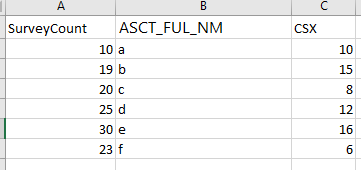
Assume the sample data like below:
If you want to rank based on [CSX] when [SurveyCount] are more than 19, you can create a calculated column like below:
Rank = IF('Contact'[SurveyCount]>19, RANKX(FILTER('Contact','Contact'[SurveyCount]>19),'Contact'[CSX],,,Dense))
Best Regards,
Qiuyun Yu
Hi @bmcgovern,
Assume the sample data like below:
If you want to rank based on [CSX] when [SurveyCount] are more than 19, you can create a calculated column like below:
Rank = IF('Contact'[SurveyCount]>19, RANKX(FILTER('Contact','Contact'[SurveyCount]>19),'Contact'[CSX],,,Dense))
Best Regards,
Qiuyun Yu
The Power BI Data Visualization World Championships is back! Get ahead of the game and start preparing now!
| User | Count |
|---|---|
| 58 | |
| 56 | |
| 36 | |
| 18 | |
| 14 |