cancel
Showing results for 
Search instead for 
Did you mean: 

The Power BI Data Visualization World Championships is back! Get ahead of the game and start preparing now! Learn more

Reply
quanple
Frequent Visitor

Quota exceeded: Your project exceeded quota for free query bytes scanned.

Hi everyone, 


We are having an issue when refresh in Power BI service. The refresh works in desktop, but fails in service. The detail error: 

ODBC: ERROR [HY000] [Microsoft][BigQuery] (100) Error interacting with REST API: Quota exceeded: Your project exceeded quota for free query bytes scanned. For more information, see https://cloud.google.com/bigquery/troubleshooting-errors


How can we fix it? 


Thanks!

2 ACCEPTED SOLUTIONS

Hi, @quanple 

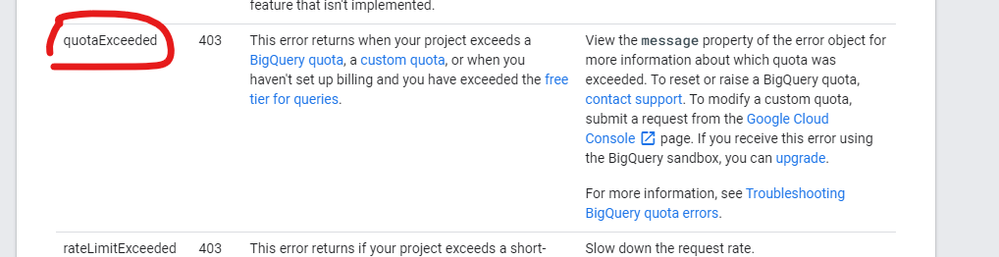
As mentioned by the error messege,for more information, see https://cloud.google.com/bigquery/troubleshooting-errors

This looks more like a problem caused by google bigquery quotas and limits. 


17.png

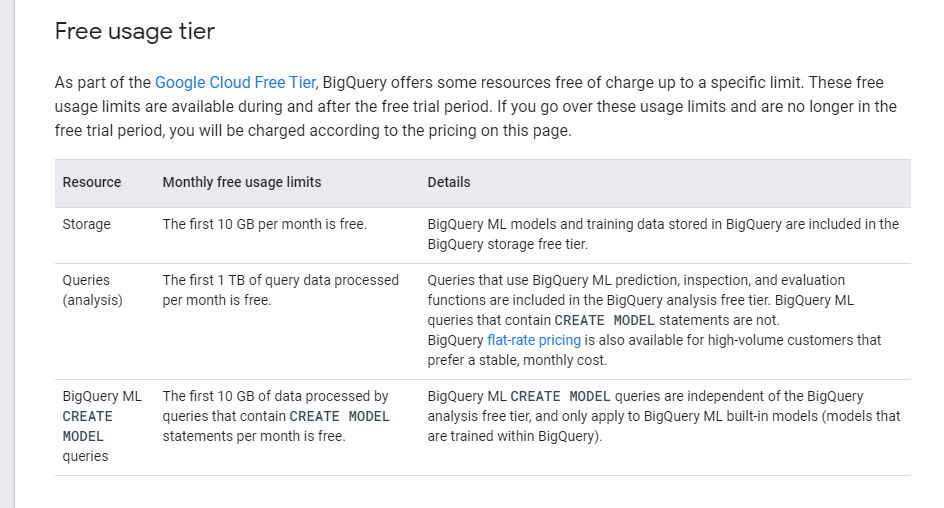
Please check the the free usage tier limits.

18.png


It is suggested to enable billing for your account so that you can access more storage.


Best Regards,
Community Support Team _ Eason

View solution in original post

Thanks,

We resolved this issue by using billing in source. 

Source = GoogleBigQuery.Database([BillingProject="projectname", UseStorageApi=false])

View solution in original post

4 REPLIES 4
abhisheknairr
New Member

@quanple 
@v-easonf-msft 

Hi, didnt understand the statement "Source = GoogleBigQuery.Database([BillingProject="projectname", UseStorageApi=false])"

How do i do this?

quanple
Frequent Visitor

Processing error: ODBC: ERROR [HY000] [Microsoft][BigQuery] (100) Error interacting with REST API: Quota exceeded: Your project exceeded quota for free query bytes scanned. For more information, see https://cloud.google.com/bigquery/troubleshooting-errors
Cluster URI: WABI-SOUTH-EAST-ASIA-B-PRIMARY-redirect.analysis.windows.net
Activity ID: 21ad96b0-e49c-47da-b715-7444d2f5c821
Request ID: 7c30f314-92d5-1e0c-f1e7-08e23a443582
Time: 2021-03-09 01:59:59Z

Hi, @quanple 

As mentioned by the error messege,for more information, see https://cloud.google.com/bigquery/troubleshooting-errors

This looks more like a problem caused by google bigquery quotas and limits. 


17.png

Please check the the free usage tier limits.

18.png


It is suggested to enable billing for your account so that you can access more storage.


Best Regards,
Community Support Team _ Eason

Thanks,

We resolved this issue by using billing in source. 

Source = GoogleBigQuery.Database([BillingProject="projectname", UseStorageApi=false])

Helpful resources

Announcements
Power BI DataViz World Championships

Power BI Dataviz World Championships

The Power BI Data Visualization World Championships is back! Get ahead of the game and start preparing now!

November Power BI Update Carousel

Power BI Monthly Update - November 2025

Check out the November 2025 Power BI update to learn about new features.

FabCon Atlanta 2026 carousel

FabCon Atlanta 2026

Join us at FabCon Atlanta, March 16-20, for the ultimate Fabric, Power BI, AI and SQL community-led event. Save $200 with code FABCOMM.