cancel
Showing results for 
Search instead for 
Did you mean: 

The Power BI Data Visualization World Championships is back! Get ahead of the game and start preparing now! Learn more

Reply
Anonymous
Not applicable

Questions on moving SSRS reports to Power BI Service.


Greetings. I've done some googling on the topic of moving SSRS reports to Power BI Service and want to clarify a few things:


  1. Premium is needed, Pro won't cut it?
  2. According to this acrticle, I should be able just to download an .rdl file from SSRS, then upload right to Power BI Service?
  3. The article doesn't account for Data Sources, Subscripions, etc. but I'm assuming I can recreate those and hook my reports in to them?
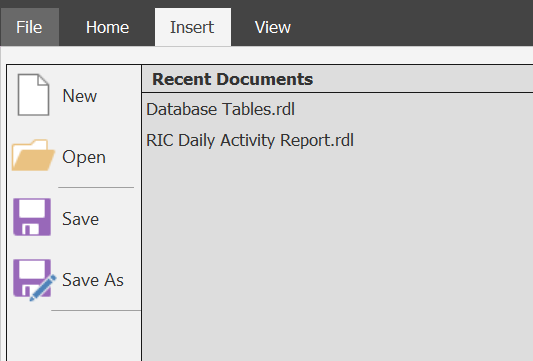
  4. In Power BI Report Builder I don't have all the options shown at the top for eidting a Workspace -- is that because I don't have Premium?

Thanks!

1 ACCEPTED SOLUTION

Hi there

You will have to open the RDL file, run it and see if it works in Power BI Report Builder.

If it does you can then upload it to your Power BI Premium App Workspace and test.


Did I answer your question? Mark my post as a solution!

Proud to be a Super User!


Power BI Blog

View solution in original post

4 REPLIES 4
GilbertQ
Super User
Super User

Hi there

Here are the answers below

1. Yes currently you need Power BI Premium
2. You will have to create the report using Power BI Report Builder and then upload that new RDL.
3. Not all data sources are supported currently in paginated reports. As well as data driven subscriptions are not working, but normal scheduled subscriptions are.
4. Power BI Report builder is the authoring tool and does not have workspace options?


Did I answer your question? Mark my post as a solution!

Proud to be a Super User!


Power BI Blog

Anonymous
Not applicable


2) So one cannot take an .rdl from SSRS and upload it? The .rdl MUST be created in Power BI Report Builder?

4) No, I seem to be missing a lot. FYI this is the first time I've ever even opened these tools, so I could be missing something glaring. 


Thanks!


Capture.PNG

About 2 - while not required, its preferred


About 4 - Inside Power BI Report Builder, click File / Save As and then Save to Power BI Service.


For moving on-prem reports to Service, you may want check out the migration tool @ https://github.com/microsoft/RdlMigration.

Hi there

You will have to open the RDL file, run it and see if it works in Power BI Report Builder.

If it does you can then upload it to your Power BI Premium App Workspace and test.


Did I answer your question? Mark my post as a solution!

Proud to be a Super User!


Power BI Blog

Helpful resources

Announcements
Power BI DataViz World Championships

Power BI Dataviz World Championships

The Power BI Data Visualization World Championships is back! Get ahead of the game and start preparing now!

December 2025 Power BI Update Carousel

Power BI Monthly Update - December 2025

Check out the December 2025 Power BI Holiday Recap!

FabCon Atlanta 2026 carousel

FabCon Atlanta 2026

Join us at FabCon Atlanta, March 16-20, for the ultimate Fabric, Power BI, AI and SQL community-led event. Save $200 with code FABCOMM.