cancel
Showing results for 
Search instead for 
Did you mean: 

The Power BI Data Visualization World Championships is back! Get ahead of the game and start preparing now! Learn more

Reply
Phil_Seamark
Microsoft Employee
Microsoft Employee

Public Shared Workspaces

I have created a new Shared Workspace and when creating it I selected the privacy setting of "Public - Anyone can see what's inside".


According to the documenation here (https://powerbi.microsoft.com/en-us/documentation/powerbi-service-create-a-group-in-power-bi/), when I create a shared workspace using this setting


Public: People in your organization can make themselves members of the group, without needing permission from an admin. As soon as they're members, they have the same permissions that other group members have.


My question is how to people who are not members of this group, make themselves a member?


Can people who are in our O365 but do not have a Pro License access this content?


To learn more about DAX visit : aka.ms/practicalDAX

Proud to be a Datanaut!

5 REPLIES 5
Seth_C_Bauer
Community Champion
Community Champion

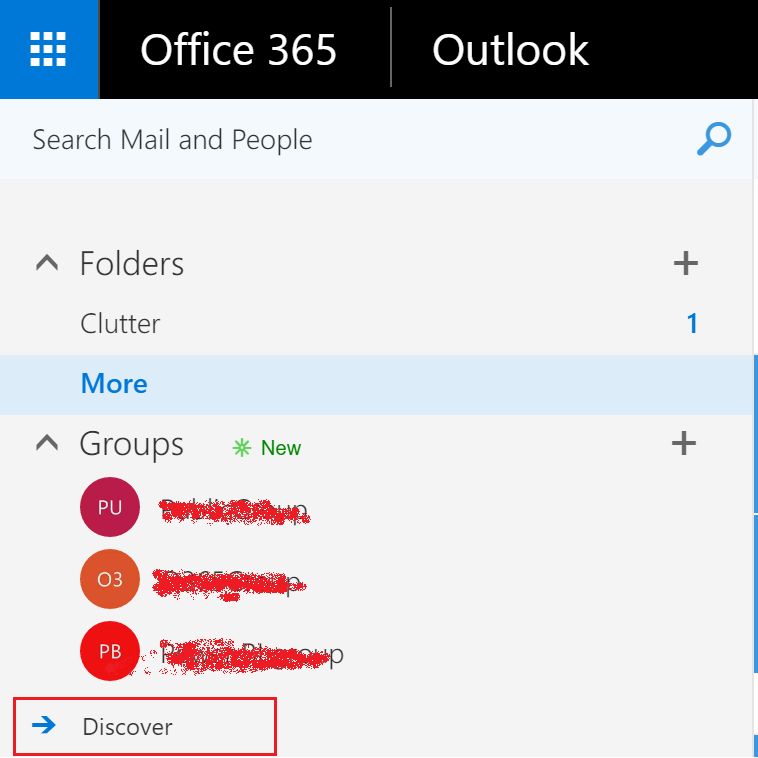
@Phil_Seamark So I just briefly tested this against another co-worker who created some test Power BI Groups. We have the full suite of Office tools, so I don't know how much of this applies. But I clicked on the grid in the upper left to access my other services. Clicked on People - Groups - "more" (at the bottom) - Discover. This popped up the search finder. I then selected a group I knew was public and when i clicked join, I was prompted to send the owner a message submitting a request to join. So.. it would appear that you need to approve any user who requests to join your public group. After acceptance, then obviously they would see any reports in your group if they had a Power BI license as well.


So long/short. Looks like this is only on the office side, and you still need to approve. Private groups, you don't have the option to join. I'd be interested if there are other ways as Groups are all over the place, but this is what I experianced.


Looking for more Power BI tips, tricks & tools? Check out PowerBI.tips the site I co-own with Mike Carlo. Also, if you are near SE WI? Join our PUG Milwaukee Brew City PUG

Hmm, thanks for looking.  I don't have those options so we may not have the ability to join shared workspaces just using Power BI


To learn more about DAX visit : aka.ms/practicalDAX

Proud to be a Datanaut!

@Phil_Seamark, I think what @Seth_C_Bauer suggested should work for you. You can follow the steps below (with @Seth_C_Bauer suggested):

1). Ask your team members to open Outlook on the web.

2). Go to Groups -> Discover:

PowerBIGroup.png

3). Select the group and click Join.


You can also check this article for the detailed information.

Hi Vicky,


That looks good but I we don't have access to the mail app.  We just get an error.  I suspect it doesn't play nicely with our existing mail system so our IT Admins have disabled that feature.


To learn more about DAX visit : aka.ms/practicalDAX

Proud to be a Datanaut!

avisingh
Advocate III
Advocate III

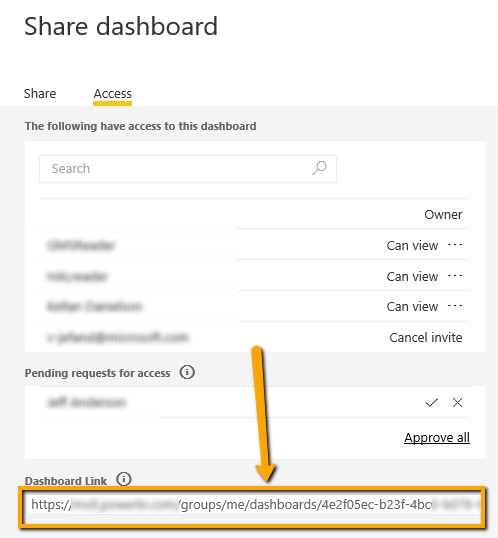
Hmmm...this may help. We granted access to our dashboard to all users (using a Security Group) but did not send email. Then we published the URL of the Dashboard on the company Intranet site. Users just click on this URL to get access.

After they've clicked once, the Dashboard also shows up in PowerBI.com so they can choose to go directly to PowerBI.com and open the Dashboard instead of going via the Intranet site.
You can send the Dashboard Link that users can click to get accessYou can send the Dashboard Link that users can click to get access

Helpful resources

Announcements
Power BI DataViz World Championships

Power BI Dataviz World Championships

The Power BI Data Visualization World Championships is back! Get ahead of the game and start preparing now!

December 2025 Power BI Update Carousel

Power BI Monthly Update - December 2025

Check out the December 2025 Power BI Holiday Recap!

FabCon Atlanta 2026 carousel

FabCon Atlanta 2026

Join us at FabCon Atlanta, March 16-20, for the ultimate Fabric, Power BI, AI and SQL community-led event. Save $200 with code FABCOMM.