Join us at FabCon Atlanta from March 16 - 20, 2026, for the ultimate Fabric, Power BI, AI and SQL community-led event. Save $200 with code FABCOMM.
Register now!The Power BI Data Visualization World Championships is back! Get ahead of the game and start preparing now! Learn more
Hello,
I currently have a report setup in powerbi where I need to see all the data in one page. To do this I have made a page with a custom height to be able to fit all my data vertically (simmilar to the way one would in excel) however now that I need to print these reports what's the best way for me to go about doing this?
Thanks,
Solved! Go to Solution.
Hi @benbaaa,
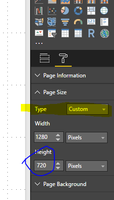
Based on my understanding, you set the page height as follows, right?
If it is, we have no "print" option in Power BI desktop to date. You should publish all your report to service. In report part, you can view your report, you can adjust the report location in one page, print one page by clicking file->print. Whatever you look in the screen, you will print the page format. There are several feature requests to date, please review and vote them.
Printing!
Print options
Proper Printing of Tables
Best Regards,
Angelia
Hi @benbaaa,
Based on my understanding, you set the page height as follows, right?
If it is, we have no "print" option in Power BI desktop to date. You should publish all your report to service. In report part, you can view your report, you can adjust the report location in one page, print one page by clicking file->print. Whatever you look in the screen, you will print the page format. There are several feature requests to date, please review and vote them.
Printing!
Print options
Proper Printing of Tables
Best Regards,
Angelia
The Power BI Data Visualization World Championships is back! Get ahead of the game and start preparing now!
| User | Count |
|---|---|
| 56 | |
| 56 | |
| 35 | |
| 18 | |
| 14 |