cancel
Showing results for 
Search instead for 
Did you mean: 

Vote for your favorite vizzies from the Power BI Dataviz World Championship submissions. Vote now!

Reply
Syndicate_Admin
Administrator
Administrator

Print panel

Good morning

I have made a panel combining graphics of different PBI, the panel is long (about 60 graphics), but when I try to print it I get this size:

josefmc08_0-1652091275326.png

And I don't know how to make it come out big. Let's see if they could help me

This is the selection I made to print:

josefmc08_1-1652091375307.png

Greetings,

Jose

1 ACCEPTED SOLUTION
Anonymous
Not applicable

Hi @Syndicate_Admin ,


Based on my test, the different layouts are caused by different browsers.


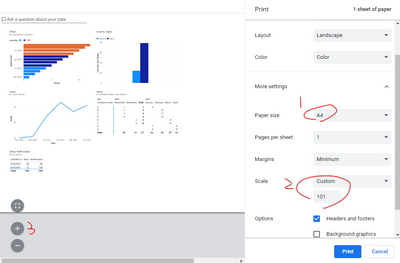
  • For Chrome :You may change the page size to A4 or custom the Scale option or directly Zoom in when hover over the grey area.

Eyelyn9_2-1652768681153.png


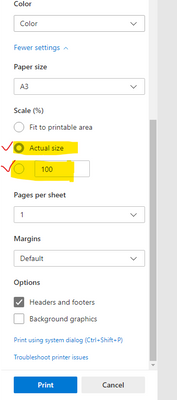
  • For Edge : As I mentioned before, change the scale type from "Fit to printable area" to "Actual size" or custom the size:


Eyelyn9_1-1652768624439.png


Best Regards,
Eyelyn Qin
If this post helps, then please consider Accept it as the solution to help the other members find it more quickly.

View solution in original post

3 REPLIES 3
Anonymous
Not applicable

Hi @Syndicate_Admin ,


Based on my test, the different layouts are caused by different browsers.


  • For Chrome :You may change the page size to A4 or custom the Scale option or directly Zoom in when hover over the grey area.

Eyelyn9_2-1652768681153.png


  • For Edge : As I mentioned before, change the scale type from "Fit to printable area" to "Actual size" or custom the size:


Eyelyn9_1-1652768624439.png


Best Regards,
Eyelyn Qin
If this post helps, then please consider Accept it as the solution to help the other members find it more quickly.

Anonymous
Not applicable

Hi @Syndicate_Admin ,


You could change the scale type from "Fit to printable area" to "Actual size" or custom the size:

Eyelyn9_0-1652317904982.png

For more information, please kindly refer to:

Print from the Power BI service - Power BI | Microsoft Docs

How to Change the Page Zoom and Text Size in Power BI Desktop


Best Regards,
Eyelyn Qin
If this post helps, then please consider Accept it as the solution to help the other members find it more quickly.

Hello Evelyn

I do not get those options that you indicate, I attach an image of what comes out:

josefmc08_0-1652717663882.png

Helpful resources

Announcements
Power BI DataViz World Championships

Power BI Dataviz World Championships

Vote for your favorite vizzies from the Power BI World Championship submissions!

Sticker Challenge 2026 Carousel

Join our Community Sticker Challenge 2026

If you love stickers, then you will definitely want to check out our Community Sticker Challenge!

January Power BI Update Carousel

Power BI Monthly Update - January 2026

Check out the January 2026 Power BI update to learn about new features.

FabCon Atlanta 2026 carousel

FabCon Atlanta 2026

Join us at FabCon Atlanta, March 16-20, for the ultimate Fabric, Power BI, AI and SQL community-led event. Save $200 with code FABCOMM.