cancel
Showing results for 
Search instead for 
Did you mean: 

The Power BI Data Visualization World Championships is back! Get ahead of the game and start preparing now! Learn more

Reply
Anonymous
Not applicable

PowerBi report slideshow

Hi All,


I need help in running the PowerBi report as a slideshow in the browser on the windows server operating system.

Earlier i was using the extension from https://github.com/DMiradakis/Power-BI-Real-Time-Slideshow now it stopped working after the removal of old GUI in the PowerBi service.


I know slideshow is possible is PowerBi mobile app for windows but i couldn't install this on the windows server operating system. Is there any way to acheive the slideshow feature in browser.


TIA

CL 

1 ACCEPTED SOLUTION

Hey @Anonymous ,


one possibility you had was the extension "Power-BI-Real-Time-Slideshow":

DMiradakis/Power-BI-Real-Time-Slideshow


Unfortunately this doesn't work anymore with the new workspaces, but the developer announced that he will update the version to work again with the new Power BI workspaces.

If you want you can ask again on GitHub when it will be available.


That is from my knowledge the only option that would exist for your case.


If you need any help please let me know.
If I answered your question I would be happy if you could mark my post as a solution ✔️ and give it a thumbs up 👍
 
Best regards
Denis
 

View solution in original post

6 REPLIES 6
selimovd
Super User
Super User

Hey @Anonymous ,


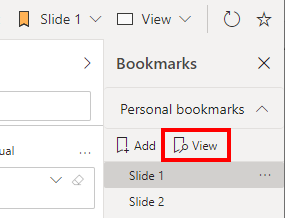
you can still go slide by slide with viewing the bookmarks:

7.png


But I guess you mean to play automatically slide by slide, right?


If you need any help please let me know.
If I answered your question I would be happy if you could mark my post as a solution ✔️ and give it a thumbs up 👍
 
Best regards
Denis
 
Anonymous
Not applicable

@selimovd  Do we have any alternative solution to acheive this requirement.

Hey @Anonymous ,


yes, you can use the Windows 10 App. There you can play the Bookmarks as a slideshow.


If you need any help please let me know.
If I answered your question I would be happy if you could mark my post as a solution ✔️ and give it a thumbs up 👍
 
Best regards
Denis
 
Anonymous
Not applicable

@selimovd  App which you suggested is working only on windows 10 machine but what we are trying on the windows server.


Do we have anywork around to acheive this requirement.

Hey @Anonymous ,


one possibility you had was the extension "Power-BI-Real-Time-Slideshow":

DMiradakis/Power-BI-Real-Time-Slideshow


Unfortunately this doesn't work anymore with the new workspaces, but the developer announced that he will update the version to work again with the new Power BI workspaces.

If you want you can ask again on GitHub when it will be available.


That is from my knowledge the only option that would exist for your case.


If you need any help please let me know.
If I answered your question I would be happy if you could mark my post as a solution ✔️ and give it a thumbs up 👍
 
Best regards
Denis
 
Anonymous
Not applicable

Yes, I want to display the report as a slideshow on a TV which will connect to server via RDP.

Helpful resources

Announcements
Power BI DataViz World Championships

Power BI Dataviz World Championships

The Power BI Data Visualization World Championships is back! Get ahead of the game and start preparing now!

December 2025 Power BI Update Carousel

Power BI Monthly Update - December 2025

Check out the December 2025 Power BI Holiday Recap!

FabCon Atlanta 2026 carousel

FabCon Atlanta 2026

Join us at FabCon Atlanta, March 16-20, for the ultimate Fabric, Power BI, AI and SQL community-led event. Save $200 with code FABCOMM.