cancel
Showing results for 
Search instead for 
Did you mean: 

The Power BI Data Visualization World Championships is back! Get ahead of the game and start preparing now! Learn more

Reply
smpa01
Super User
Super User

Power BI to email excel reports

Hello guys,


I am on premium capacity and I want to create a facilty to send the excel version of a report to the subscribers.


How do I do it? is is it done by using Paginated report builder? 0- never use it though.


Can someone please explain.


Thank you in advance.


Did I answer your question? Mark my post as a solution!
Proud to be a Super User!
My custom visualization projects
Plotting Live Sound: Viz1
Beautiful News:Viz1, Viz2, Viz3
Visual Capitalist: Working Hrs
2 ACCEPTED SOLUTIONS
GilbertQ
Super User
Super User

Hi there

Here are details on how to achieve this

https://powerbi.microsoft.com/en-us/blog/e-mail-subscriptions-for-paginated-reports-is-now-available...


Did I answer your question? Mark my post as a solution!

Proud to be a Super User!


Power BI Blog

View solution in original post

v-yingjl
Community Support
Community Support

Hi @smpa01 ,

You can use Paginated report to send subscriptions to others as @ GilbertQ mentioned blog.

Here is a tutorial about how to create paginated report using power bi report builder setp by setp that you can refer:

Tutorial: Create a paginated report and upload it to the Power BI service 

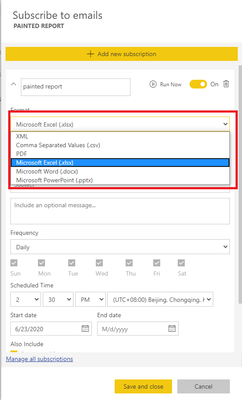
After publishing paginated report to power bi service, when you open this report, you can choose the format when you create a subscription:

subscribe.png


Best Regards,
Yingjie Li

If this post helps then please consider Accept it as the solution to help the other members find it more quickly.

View solution in original post

5 REPLIES 5
v-yingjl
Community Support
Community Support

Hi @smpa01 ,

You can use Paginated report to send subscriptions to others as @ GilbertQ mentioned blog.

Here is a tutorial about how to create paginated report using power bi report builder setp by setp that you can refer:

Tutorial: Create a paginated report and upload it to the Power BI service 

After publishing paginated report to power bi service, when you open this report, you can choose the format when you create a subscription:

subscribe.png


Best Regards,
Yingjie Li

If this post helps then please consider Accept it as the solution to help the other members find it more quickly.

Thanks @v-yingjl  and @GilbertQ 

Did I answer your question? Mark my post as a solution!
Proud to be a Super User!
My custom visualization projects
Plotting Live Sound: Viz1
Beautiful News:Viz1, Viz2, Viz3
Visual Capitalist: Working Hrs

You are welcome.🙂


Regards,

Yingjie Li

Happy to help!


Did I answer your question? Mark my post as a solution!

Proud to be a Super User!


Power BI Blog

GilbertQ
Super User
Super User

Hi there

Here are details on how to achieve this

https://powerbi.microsoft.com/en-us/blog/e-mail-subscriptions-for-paginated-reports-is-now-available...


Did I answer your question? Mark my post as a solution!

Proud to be a Super User!


Power BI Blog

Helpful resources

Announcements
Power BI DataViz World Championships

Power BI Dataviz World Championships

The Power BI Data Visualization World Championships is back! Get ahead of the game and start preparing now!

November Power BI Update Carousel

Power BI Monthly Update - November 2025

Check out the November 2025 Power BI update to learn about new features.

FabCon Atlanta 2026 carousel

FabCon Atlanta 2026

Join us at FabCon Atlanta, March 16-20, for the ultimate Fabric, Power BI, AI and SQL community-led event. Save $200 with code FABCOMM.