cancel
Showing results for 
Search instead for 
Did you mean: 

The Power BI Data Visualization World Championships is back! Get ahead of the game and start preparing now! Learn more

Reply
nandic
Resident Rockstar
Resident Rockstar

Power BI - data source credentials - Azure Directory Interactive

Hi,

I am in doubt which authentication goes behind the scene when running the report.
1) report created via Report Builder (direct query connection to Azure SQL database)
2) report is published to Power BI Service
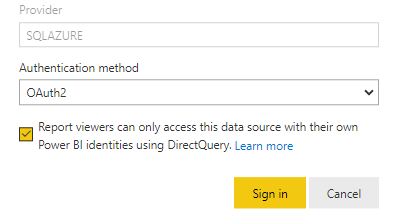
3) i typed my credentials under report -> edit credentials (there is no option for dataset as nothing is imported, it uses direct query)
4) if anyone downloads and opens the report and goes to data source settings > build connection string > their user is recognized as authentication is "Active Directory Interactive"

My questions:
1) Why do i provide credentials in 3rd step if authentication is Azure Interactive?
2) When other users run the report, will it use my (entered credentials) or it will use credentials of user who runs the report?
3) If i uncheck option: "Report viewers can only access this data source with their own Power BI identities using DirectQuery", does it mean that my credentials are sent to database even though different user is running the report?
 

nandic_0-1620903966730.png


Once again: report builder report based on direct query to Azure SQL database. Authentication: Azure Directory Interactive.


Thanks in advance,
Nemanja Andic

1 ACCEPTED SOLUTION
GilbertQ
Super User
Super User

Hi @nandic 


My understanding is the following:


1. If you have the tick enabled it will then automatically use the users logged in details to access the Azure SQL Database. So you will need to ensure that those user accounts have got the right access to the Azure SQL Database.

2. If you remove the ticket (Disabled) and you put in your credentials, your credentials will then be used to run queries against the Azure SQL database.


Did I answer your question? Mark my post as a solution!

Proud to be a Super User!


Power BI Blog

View solution in original post

4 REPLIES 4
GilbertQ
Super User
Super User

Glad to assist!


Did I answer your question? Mark my post as a solution!

Proud to be a Super User!


Power BI Blog

GilbertQ
Super User
Super User

Hi @nandic 


My understanding is the following:


1. If you have the tick enabled it will then automatically use the users logged in details to access the Azure SQL Database. So you will need to ensure that those user accounts have got the right access to the Azure SQL Database.

2. If you remove the ticket (Disabled) and you put in your credentials, your credentials will then be used to run queries against the Azure SQL database.


Did I answer your question? Mark my post as a solution!

Proud to be a Super User!


Power BI Blog

Thank you very much, you are correct!
I managed to test it on my side and it works as expected.


Example:

If my user credentials are used and this option unchecked, if any other user runs the report it will work.

If my user credentials are used and this option is checked, if any other user without permissions to this table/view runs the report it will fail as now authentication has been done (Azure interactive) and sql database permissions checked. 


Best regards,

Nemanja Andic

nandic
Resident Rockstar
Resident Rockstar

@GilbertQ , i have seen that you wrote and investigated a lot regarding Power BI Service, if you are familiar with this i would be very thankful.

Helpful resources

Announcements
Power BI DataViz World Championships

Power BI Dataviz World Championships

The Power BI Data Visualization World Championships is back! Get ahead of the game and start preparing now!

December 2025 Power BI Update Carousel

Power BI Monthly Update - December 2025

Check out the December 2025 Power BI Holiday Recap!

FabCon Atlanta 2026 carousel

FabCon Atlanta 2026

Join us at FabCon Atlanta, March 16-20, for the ultimate Fabric, Power BI, AI and SQL community-led event. Save $200 with code FABCOMM.