cancel
Showing results for 
Search instead for 
Did you mean: 

The Power BI Data Visualization World Championships is back! Get ahead of the game and start preparing now! Learn more

Reply
Dylan_Probyn
Regular Visitor

Power BI Service refresh with different data sources

Hi All


I currently have a report that imports CSV files from a sharepoint and needs to be refresh in Power Bi desktop and re-published to the service everytime I update it.


Recently I have gotten access to an API whereby I can retrieve some of the information that is imported from the above mentioned Sharepoint queries.


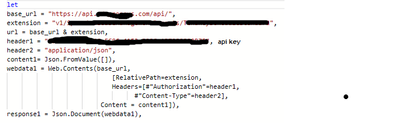
My API post query looks as follows and works perfectly fine when it is it's own data set (in a different PBIX from the Sharepoint PBIX). I am able to setup a scheduled refresh on the below without any issues.
Dylan_Probyn_0-1649691472690.png


However, when I include the above API query in my workbook containing the Sharepoint queries (in an attempt to combine the data sources) and publish this to Power Bi Service. I get the following error:

Dylan_Probyn_1-1649691631624.png

It works just fine in Power Bi dekstop and the error only occurs when I try refresh the data in the service.


I would like to know why this error only occurs when I combine both the data sources into one workbook. Am I wasting my time trying to get these to work together?


Thanks for any help in advance.

Dylan


1 ACCEPTED SOLUTION
Anonymous
Not applicable

Hi @Dylan_Probyn ,


Make sure you go to the Dataset, then find “Data source credentials” and make sure you don’t have any "x"es next to “edit credentials”. Even if the endpoint is public you need to explicitly tell Power BI that by clicking on the Edit credentials link.


And don’t use a dynamic URL when using Web.Contents, just put the whole url AS A STRING in there and it will refresh.


For more detailed information you can refer to.Power BI - Solution to 'This dataset includes a dynamic data source ... this dataset won't be refres... 


You can also check out these similar threads to see if they help.

Error while schedule refresh - getting error " This dataset includes a dynamic data source. " 

Dynamic data sources aren't refreshed in the Power BI service. 


Best Regards,
Community Support Team _ Caitlyn

If this post helps then please consider Accept it as the solution to help the other members find it more quickly.

View solution in original post

3 REPLIES 3
Anonymous
Not applicable

Hi @Dylan_Probyn ,


Make sure you go to the Dataset, then find “Data source credentials” and make sure you don’t have any "x"es next to “edit credentials”. Even if the endpoint is public you need to explicitly tell Power BI that by clicking on the Edit credentials link.


And don’t use a dynamic URL when using Web.Contents, just put the whole url AS A STRING in there and it will refresh.


For more detailed information you can refer to.Power BI - Solution to 'This dataset includes a dynamic data source ... this dataset won't be refres... 


You can also check out these similar threads to see if they help.

Error while schedule refresh - getting error " This dataset includes a dynamic data source. " 

Dynamic data sources aren't refreshed in the Power BI service. 


Best Regards,
Community Support Team _ Caitlyn

If this post helps then please consider Accept it as the solution to help the other members find it more quickly.

GilbertQ
Super User
Super User

Hi @Dylan_Probyn 


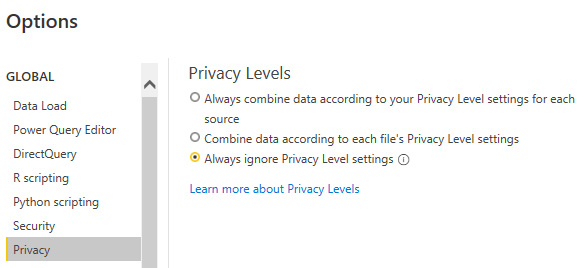
What happens when you change the Privacy settings to "Always ignore Privacy level Settings?"


That might help allow the different data sources to combine


You can change the settings in PBI Desktop under options, options and settings and then Privacy

GilbertQ_0-1649714230883.png


Did I answer your question? Mark my post as a solution!

Proud to be a Super User!


Power BI Blog

Hi @GilbertQ 

Thanks for the suggestion, unfortunately I already have this option selected.

Best

Helpful resources

Announcements
Power BI DataViz World Championships

Power BI Dataviz World Championships

The Power BI Data Visualization World Championships is back! Get ahead of the game and start preparing now!

December 2025 Power BI Update Carousel

Power BI Monthly Update - December 2025

Check out the December 2025 Power BI Holiday Recap!

FabCon Atlanta 2026 carousel

FabCon Atlanta 2026

Join us at FabCon Atlanta, March 16-20, for the ultimate Fabric, Power BI, AI and SQL community-led event. Save $200 with code FABCOMM.