cancel
Showing results for 
Search instead for 
Did you mean: 

The Power BI Data Visualization World Championships is back! It's time to submit your entry. Live now!

Reply
abhishekpansotr
New Member

Power BI Publisher

I am able to login into Power BI Publisher into Excel using Power BI publisher but when I try to Connect the report it says an error "Can't access the dataset or the report  You can't access the dataset or report in PowerBI.  Make sure it exists and you have permissions to use it"

Tried reconnecting also.

Change excel version to Excel 2017 also. But no improvement.

2 REPLIES 2
v-frfei-msft
Community Support
Community Support

Hi @abhishekpansotr,


Please have a try of this way.


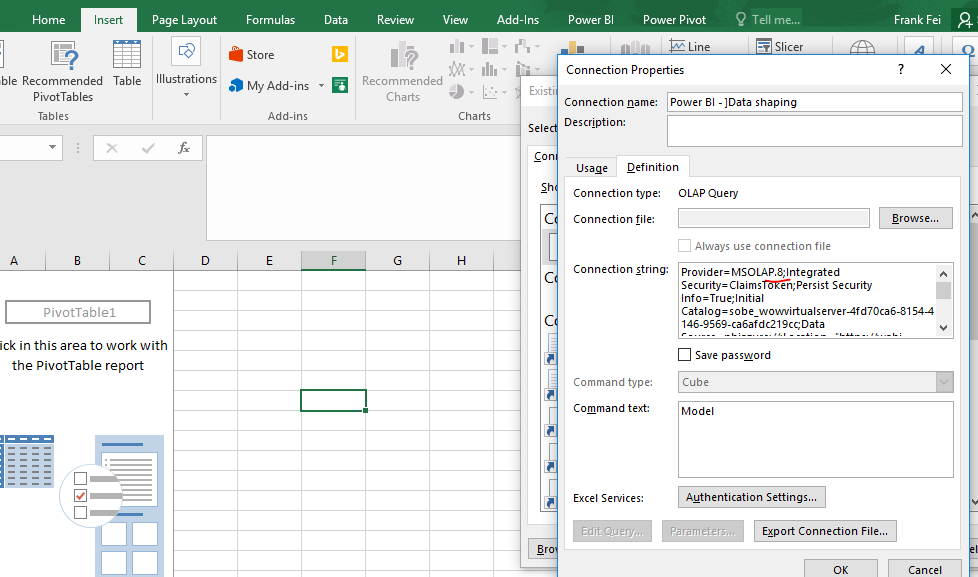
Attached a photo to help with the steps

  1. go to the Insert tab
  2. click pivot table
  3. choose "Use an external data source" and then "Choose connection" button
  4. right click on the connection, it should be "Power BI - <dataset name>"
  5. click "Edit Connection properties"
  6. go to Definition tab
  7. on the start of the connection string there is "MSOLAP.8" please change it to "MSOLAP" (remove the ".7")
  8. click ok => open => ok


Capture.PNG


Regards,

Frank

Community Support Team _ Frank
If this post helps, then please consider Accept it as the solution to help the others find it more quickly.
ahmed11
New Member

i am facing the same issue

Helpful resources

Announcements
FabCon Atlanta 2026 carousel

FabCon Atlanta 2026

Join us at FabCon Atlanta, March 16-20, for the ultimate Fabric, Power BI, AI and SQL community-led event. Save $200 with code FABCOMM.