cancel
Showing results for 
Search instead for 
Did you mean: 

The Power BI Data Visualization World Championships is back! Get ahead of the game and start preparing now! Learn more

Reply
flo3o
Frequent Visitor

Power BI LinkedIn API

Hello all,


I wrote in Power BI Desktop a code, where I can access an LinkedIn API anonymously with an access token which I save manually in a parameter. Then I published the dashboard in a workspace and there I wanted to connect the sources, but it was not possible. I can choose the anonymous connection, but I saw no way to add an access token. Is there a way to use an access token for Power BI service to connect to data sources?


Thanks,

Florian


Power BI Desktop:

flo3o_0-1719400624208.png


Power BI service:

Fehler beim Aktualisieren der Datenquellen-Anmeldeinformationen: Web.Contents failed to get contents from 'https://api.linkedin.com/rest/adAnalytics?q=analytics&pivot=CAMPAIGN&timeGranularity=MONTHLY&dateRan...' (400): Bad Request

1 ACCEPTED SOLUTION
Anonymous
Not applicable

Hi @flo3o ,


You can create a dataflow and then put the code in your screenshot into a blank query.

vkaiyuemsft_0-1719472450528.png


You can also try to select LinkedIn Learning in the data flow and fill in the corresponding parameters in the corresponding position.

vkaiyuemsft_1-1719472457268.png

For more details, please refer to the document:

LinkedIn Learning API - First Steps - LinkedIn | Microsoft Learn


If your Current Period does not refer to this, please clarify in a follow-up reply.


Best Regards,

Clara Gong

If this post helps, then please consider Accept it as the solution to help the other members find it more quickly.

View solution in original post

3 REPLIES 3
ReportMaster
Post Partisan
Post Partisan

Hi @flo3o were you able to find a solution? As a workaround, maybe you can try to test your connection with a 3rd party connector. I currently use windsor.ai 's Linkedin Ads connector and I haven't had any problem with my data. In case you wonder, to make the connection first search for the Linkedin connector in the data sources list:


LINKEDIN-ADS-1.png


After that, just grant access to your Linkedin account using your credentials, then on preview and destination page you will see a preview of your Linkedin fields:


LINKEDIN-ADS-2.png


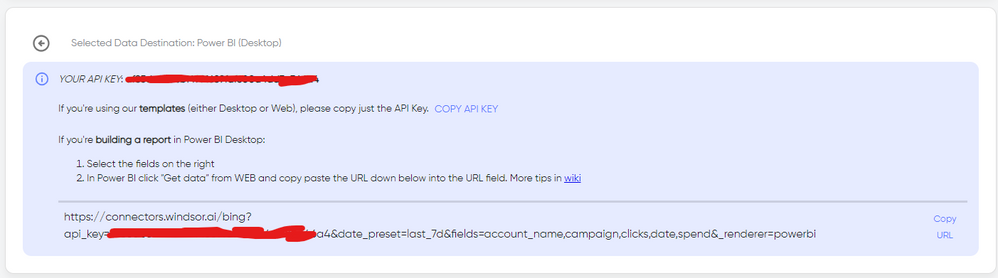
There just select the fields you need. Finally, just select PBI as your data destination and finally just copy and paste the url on PBI --> Get Data --> Web --> Paste the url.


SELECT_DESTINATION_NEW.png

Hi yes the solution from cst worked 🙂

Anonymous
Not applicable

Hi @flo3o ,


You can create a dataflow and then put the code in your screenshot into a blank query.

vkaiyuemsft_0-1719472450528.png


You can also try to select LinkedIn Learning in the data flow and fill in the corresponding parameters in the corresponding position.

vkaiyuemsft_1-1719472457268.png

For more details, please refer to the document:

LinkedIn Learning API - First Steps - LinkedIn | Microsoft Learn


If your Current Period does not refer to this, please clarify in a follow-up reply.


Best Regards,

Clara Gong

If this post helps, then please consider Accept it as the solution to help the other members find it more quickly.

Helpful resources

Announcements
Power BI DataViz World Championships

Power BI Dataviz World Championships

The Power BI Data Visualization World Championships is back! Get ahead of the game and start preparing now!

December 2025 Power BI Update Carousel

Power BI Monthly Update - December 2025

Check out the December 2025 Power BI Holiday Recap!

FabCon Atlanta 2026 carousel

FabCon Atlanta 2026

Join us at FabCon Atlanta, March 16-20, for the ultimate Fabric, Power BI, AI and SQL community-led event. Save $200 with code FABCOMM.