cancel
Showing results for 
Search instead for 
Did you mean: 

Vote for your favorite vizzies from the Power BI Dataviz World Championship submissions. Vote now!

Reply
XIOFEN_LIM
Helper II
Helper II

Power BI Admin how to get the owner of personal workspace

Hi,


Anyone know how to get the owner info from workspace ewhich is personal group type as highlighted below?

XIOFEN_LIM_0-1706599590518.png


6 REPLIES 6
dsjyuama
New Member

 any update?
trying to take ownership of PesonalWorkspace of an employee who is no longer with the company.  "Get Access" is not availble when clicking on the option button. I am logged in as Global Admin, PowerPlatform Admin, and Fabric admin. 

ibarrau
Super User
Super User

Hi. What do you mean with owner info? the name of the owner of the personal workspace is right there.

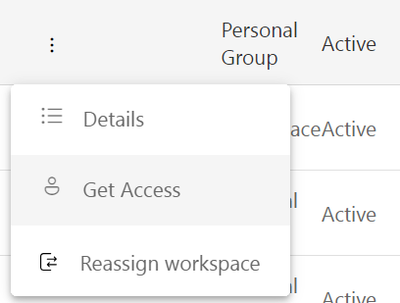
If you need to view content of the workspace, as admin, you can grant you with temporal access to the workspace and check the content:

ibarrau_0-1706626807533.png


I hope that helps,


If this post helps, then please consider Accept it as the solution to help the other members find it more quickly.

Happy to help!

LaDataWeb Blog

Hi @ibarrau,


Yes, is to get the owner name.
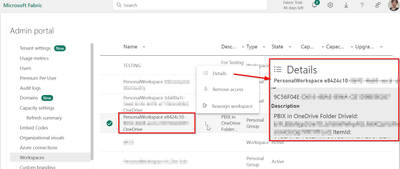
But I did tried the method to get access but there is nothing to show in the details.

XIOFEN_LIM_1-1706666602151.png

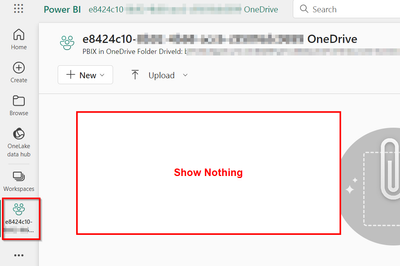
Even when i opened that workspace, it is empty.

XIOFEN_LIM_2-1706666694435.png

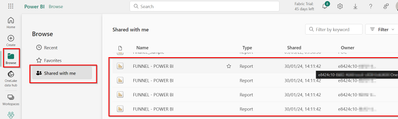
But when i access from "Shared with me", there is actually a report under same owner.
And also I have no permission to access that report.

XIOFEN_LIM_3-1706666835766.png


May I know is there any way to trace back the owner based on onedrive ID or any??


If after you get access you can't read the name of the guest/user, then it might be an App. You can only know the app if you are global admin or have permission to check registered apps over EntraID.

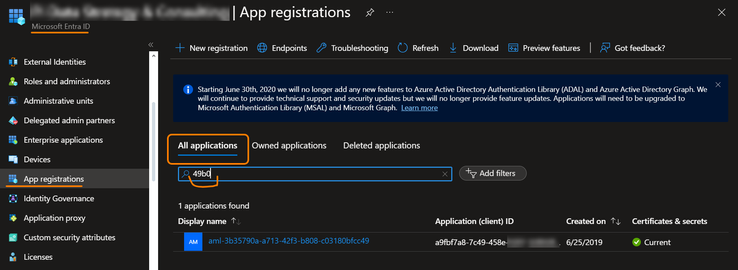
You can open Portal Azure, go to Entra ID and check the apps. For example I have one persona workspace that starts with "49b0...", so I search that and find the app.

ibarrau_0-1706703835669.png

The creator of the app has used the name "aml-3b...." Depeding on the creator the name of the app.

I hope that helps,


If this post helps, then please consider Accept it as the solution to help the other members find it more quickly.

Happy to help!

LaDataWeb Blog

Hi @ibarrau ,


But it is a report but not app. And I cant find the app.

Just in case, When I said App in Azure. That means a service account, also known as Service Principal. It's like a user. It's not a Power Bi App or something like that. So the ID: "e8424...." means a Service Principal (an account). That's why the name of the workspace starts like that. You said you where looking for the owner. Well, that's the account that owns the workspace and its reports.

I hope that make sense


If this post helps, then please consider Accept it as the solution to help the other members find it more quickly.

Happy to help!

LaDataWeb Blog

Helpful resources

Announcements
Power BI DataViz World Championships

Power BI Dataviz World Championships

Vote for your favorite vizzies from the Power BI World Championship submissions!

Sticker Challenge 2026 Carousel

Join our Community Sticker Challenge 2026

If you love stickers, then you will definitely want to check out our Community Sticker Challenge!

January Power BI Update Carousel

Power BI Monthly Update - January 2026

Check out the January 2026 Power BI update to learn about new features.

FabCon Atlanta 2026 carousel

FabCon Atlanta 2026

Join us at FabCon Atlanta, March 16-20, for the ultimate Fabric, Power BI, AI and SQL community-led event. Save $200 with code FABCOMM.