
Share feedback directly with Fabric product managers, participate in targeted research studies and influence the Fabric roadmap.
Sign up nowGet Fabric certified for FREE! Don't miss your chance! Learn more
I'm having an issue around published dashboard that connect to PostgreSQL that do not work. From my Power BI desktop, I can connect to PostgreSQL and build a (direct query) viz with no issues. I can even publish and get the "success" window. However, when I go to view the published dashboard, I get an access error about credentials.
I have not modified anything on the PostgreSQL/ AWS side, but I'm wondering if there is something outside of Power BI that needs to be modified (maybe ralated to SSL)?
Thank you.
Thank you in advanced
Solved! Go to Solution.
Hi, @Anonymous
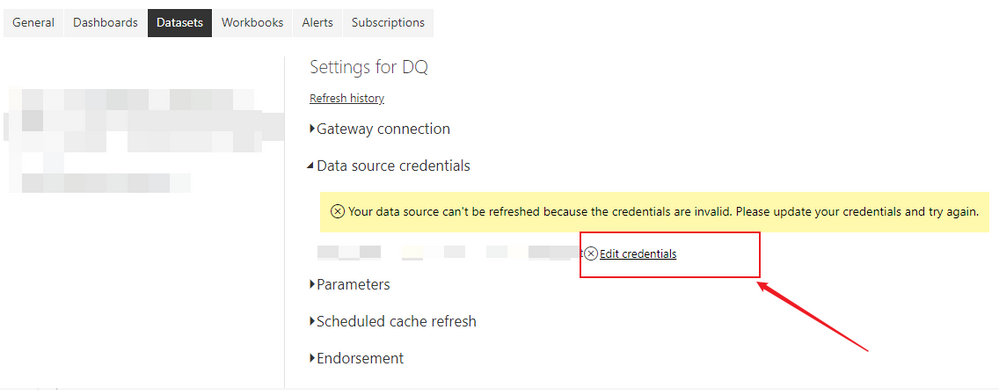
Enter the datasets settings in the power bi service, and edit the credentials under the data source credentials.
If the server is on-premises, you'll also need to configure the gateway and make sure it works.
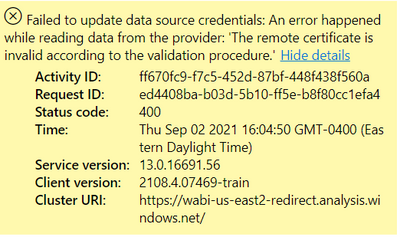
error:
Click on Settings->Datasets and edit the credentials:
For reference:
https://carldesouza.com/using-direct-query-vs-import-with-power-bi/
https://stackoverflow.com/questions/58616839/powerbi-online-vs-desktop-credentials-for-sql-server
Hope this helps.
Best Regards,
Community Support Team _ Zeon Zheng
If this post helps, then please consider Accept it as the solution to help the other members find it more quickly.
Hi, @Anonymous
Enter the datasets settings in the power bi service, and edit the credentials under the data source credentials.
If the server is on-premises, you'll also need to configure the gateway and make sure it works.
error:
Click on Settings->Datasets and edit the credentials:
For reference:
https://carldesouza.com/using-direct-query-vs-import-with-power-bi/
https://stackoverflow.com/questions/58616839/powerbi-online-vs-desktop-credentials-for-sql-server
Hope this helps.
Best Regards,
Community Support Team _ Zeon Zheng
If this post helps, then please consider Accept it as the solution to help the other members find it more quickly.
If you love stickers, then you will definitely want to check out our Community Sticker Challenge!
Check out the January 2026 Power BI update to learn about new features.
| User | Count |
|---|---|
| 19 | |
| 7 | |
| 7 | |
| 7 | |
| 7 |
| User | Count |
|---|---|
| 51 | |
| 46 | |
| 25 | |
| 25 | |
| 23 |