cancel
Showing results for 
Search instead for 
Did you mean: 

The Power BI Data Visualization World Championships is back! Get ahead of the game and start preparing now! Learn more

Reply
Anonymous
Not applicable

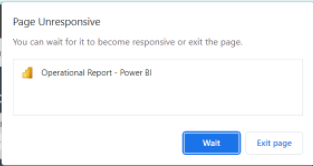
Page Unresponsive error

Hello Everyone,


I've published my report to PBI workspace, but whenever I try to open the report from there pages are not loading completely and also getting error as "Page Unresponsive".


Rimi_2095_0-1654157814088.png

Even client also getting same error while opening it.. Can anyone please suggest why is this error coming and how to fix it?


@amitchandak @Jihwan_Kim @Ashish_Mathur @SpartaBI @speedramps @ribisht17 @johnt75 @rohit_singh @GilbertQ @Tutu_in_YYC 

1 ACCEPTED SOLUTION
v-cazheng-msft
Community Support
Community Support

Hi @Anonymous,


In most cases, it’s a transient issue. If you close your browser and come back, this issue should go away. Or you can clear the cache of your browser like GilbertQ said, then re-log in Power BI service.


For something related to clear browser cache data, you may have a look at this link: Difference between Cache and Cookies - GeeksforGeeks.


If there is any post helps, then please consider Accept it as the solution to help the other members find it more quickly. If I misunderstand your needs or you still have problems on it, please let me. Thanks a lot!


Best Regards,

Community Support Team _ Caiyun

View solution in original post

2 REPLIES 2
v-cazheng-msft
Community Support
Community Support

Hi @Anonymous,


In most cases, it’s a transient issue. If you close your browser and come back, this issue should go away. Or you can clear the cache of your browser like GilbertQ said, then re-log in Power BI service.


For something related to clear browser cache data, you may have a look at this link: Difference between Cache and Cookies - GeeksforGeeks.


If there is any post helps, then please consider Accept it as the solution to help the other members find it more quickly. If I misunderstand your needs or you still have problems on it, please let me. Thanks a lot!


Best Regards,

Community Support Team _ Caiyun

GilbertQ
Super User
Super User

Hi @Anonymous 


Can you ensure that you clear the browser cache, also log out and log back in again?


And finally do other Power BI reports work?


Did I answer your question? Mark my post as a solution!

Proud to be a Super User!


Power BI Blog

Helpful resources

Announcements
Power BI DataViz World Championships

Power BI Dataviz World Championships

The Power BI Data Visualization World Championships is back! Get ahead of the game and start preparing now!

December 2025 Power BI Update Carousel

Power BI Monthly Update - December 2025

Check out the December 2025 Power BI Holiday Recap!

FabCon Atlanta 2026 carousel

FabCon Atlanta 2026

Join us at FabCon Atlanta, March 16-20, for the ultimate Fabric, Power BI, AI and SQL community-led event. Save $200 with code FABCOMM.